 Awesome Windows 11 (v3.7.0)
First help for setup, tweaks and ISO images
**In the process of moving to v4.0**!
> MORE PROJECTS: https://github.com/awesome-windows11
>
> Site: https://windows12.glitch.me
>
> VK: https://vk.com/flighthub
>
> Telegram: https://t.me/windows11_chat
🔗 Setup Windows
❗ Important
[Gsudo (NT/SYSTEM console)](https://github.com/gerardog/gsudo)
[Hidden Apps AutoRun](https://www.nirsoft.net/utils/whatinstartup-x64.zip)
[AppInstaller (winget)](https://github.com/microsoft/winget-cli)
[MBR to GPT (without data loss)](http://www.it.nrru.ac.th/download/utilities/pwfree9.exe)
[OfflineInsider (WinInsider witout Microsoft Account)](https://github.com/abbodi1406/offlineinsiderenroll)
[Utilities](https://github.com/farag2/Utilities)
[HACK: Password Brute Force](https://github.com/InfosecMatter/Minimalistic-offensive-security-tools)
[Activation Scripts](https://github.com/massgravel/Microsoft-Activation-Scripts)
🧰 [SafeMode Launcher](https://www.sordum.org/12964/safe-mode-launcher-v1-1/)
🗑 [BulkCrap Uninstaller](https://github.com/Klocman/Bulk-Crap-Uninstaller)
✨ [Portable Registrator](https://github.com/SiL3NC3/PortableRegistrator)
 Windows Defender
[Defender Control](https://www.sordum.org/files/downloads.php?st-defender-control)
[Defeat Defender](https://github.com/swagkarna/Defeat-Defender-V1.2)
[Configure Defender](https://github.com/AndyFul/ConfigureDefender)
 Windows Update
https://github.com/DavidXanatos/wumgr
https://github.com/WereDev/Wu10Man
 Microsoft Store Apps
[Remove MS Store Apps](https://github.com/Digressive/Remove-MS-Store-Apps)
[Windows 10 Debloater](https://github.com/Sycnex/Windows10Debloater)
✨ [Win10 Bloat Remover](https://github.com/Fs00/Win10BloatRemover)
✨ [Equk](https://github.com/equk/windows)
✨ [Windows10 PostInstall](https://github.com/r33int/Windows10-Postinstall)
✨ [Windows Optimize Harden Debloat](https://github.com/simeononsecurity/Windows-Optimize-Harden-Debloat/blob/master/sos-optimize-windows.ps1)
✨ [Chris Titus Tech](https://github.com/ChrisTitusTech/win10script)
🛠 Tweaks (Win11)
[Custom Context Menu](https://github.com/ikas-mc/ContextMenuForWindows11)
[Windows Fixer](https://github.com/99natmar99/Windows-11-Fixer)
[Old Start Menu](https://github.com/bbmaster123/10SM)
[Start All Back](https://www.startallback.com/)
[Explorer Patcher (Old TaskBar)](https://github.com/valinet/ExplorerPatcher)
[privacy.sexy](https://github.com/undergroundwires/privacy.sexy)
[Windows 11 Guide](https://github.com/mikeroyal/Windows-11-Guide)
[Twinkle Tray](https://github.com/xanderfrangos/twinkle-tray)
☠ [OUTDATED: Drag And Drop To Taskbar Fix](https://github.com/HerMajestyDrMona/Windows11DragAndDropToTaskbarFix)
☠ [OUTDATED: Windows Thumbnail Generator Folder](https://github.com/hahagu/WindowsThumbnailGenerator)
Setup Windows
💿 Download ISO
https://uupdump.net
https://tb.rg-adguard.net/public.php
https://uup.rg-adguard.net
[Windows ISO Downloader](https://www.heidoc.net/joomla/technology-science/microsoft/67-microsoft-windows-and-office-iso-download-tool)
https://github.com/pbatard/Fido
⬇ Install ISO
[❗ My files](https://filedn.eu/lFS6h5cBEsru02lgr5VwkTJ)
https://github.com/pbatard/rufus
https://github.com/ventoy/Ventoy
https://github.com/AveYo/MediaCreationTool.bat
[Windows Insider Build ISO](https://www.microsoft.com/en-us/software-download/windowsinsiderpreviewiso)
[Rectify11](https://rectify.vercel.app)
[BlissOS](https://blissos.org/index.html)
💽 Bypass TPM
[TPM: About, Installer, Bypass, FAQ](https://github.com/awesome-windows11/windows11/wiki/%F0%9F%92%BD-TPM)
https://github.com/quickfever/Windows-11-Bypass-TPM
https://github.com/haithamaouati/BypassWin11
https://github.com/shirooo39/Windows-11-Bypass
https://github.com/rushiranpise/win11devbypass
https://github.com/FrancescoDiSalesGithub/TPM-windows11-hack
Hash ISO
[💿 Known ISO file hashes (check for originality)](https://github.com/awesome-windows11/windows11/wiki/%F0%9F%92%BF-ISO)
https://msdn.rg-adguard.net
https://sha1.rg-adguard.net
https://www.heidoc.net/php/myvsdump_directory.php?letter=W
https://files.rg-adguard.net/version/f0bd8307-d897-ef77-dbd6-216fefbe94c5
https://github.com/AndrewRathbun/VanillaWindowsReference
Versions Windows
https://github.com/awesome-windows11/windows11/tree/main/version
https://changewindows.org/timeline/pc
Apps
🎨 Media (Video, Audio)
Open `.ogg` file: https://apps.microsoft.com/store/detail/web-media-extensions/9N5TDP8VCMHS
Windows Media Player: https://apps.microsoft.com/store/detail/windows-media-player/9WZDNCRFJ3PT
🔓 Activators
### 🔓 Activator by Ratiborus
В AAct все операции с активацией, с лицензиями, выполняются с помощью стандартных скриптов slmgr.vbs и ospp.vbs, уж их то даже самый ненормальный антивирусник не заподозрит в "троянстве".
http://forum.ru-board.com/topic.cgi?forum=2&topic=5559
В чём отличие KMSAuto Net 2016 1.5.0 и Portable AAct?
Принципиальное отличие этих двух программ в том, что у первой для работы программы требуется .NET Framework 4.5 , а вот для второй НЕ требуется .NET Framework, работает на Windows XP - 10.
С другой стороны KMSAuto Net имеет намного больше возможностей по настройке процесса активации, чем AAct и иногда позволяет решить проблемы с KMS-активацией там, где AAct не справляется. Или, если использовать автомобильную терминологию, первая программа является высокоэффективной ручной коробкой передач, позволяющей опытному водителю использовать ее возможности по максимуму, в то время как вторая программа является "автоматом", более подходящим для новичков и домохозяек.
💾 Hash
Hash files are commonly used as a method of verifying file size. This process is called check-sum verification. When a file is sent over a network, it must be broken into small pieces and reassembled after it reaches its destination. In this situation the hash number represents the size of the data in a file. The hash can then be used as a tool for validating the entire file was successfully transmitted over the network.
Hashes cannot be reversed, so simply knowing the result of a file’s hash from a hashing algorithm does not allow you to reconstruct the file’s contents. What it does allow you to do, however, is determine whether two files are identical or not without knowing anything about their contents.
For this reason, the idea that the result is unique is fundamental to the whole concept of hashes. If two different files could produce the same digest, we would have a “collision”, and we would not be able to use the hash as a reliable identifier for that file.
The possibility of producing a collision is small, but not unheard of, and is the reason why more secure algorithms like SHA-2 have replaced SHA-1 and MD5.
An integrity hash (e.g. CRC32), sometimes called a "redundancy hash", has the properties necessary to provide a fairly good indication of accidental corruption of a file. These hashes will generally produce a different hash when a bit is changed, but will not withstand someone purposefully trying to generate a collision. For example, the strings "Maria has nine red beds." and "Steven has fifteen white tables." are different but generate the same CRC32 hash of 0ECB65F5. The general requirements for integrity hashes are as follows:
A cryptographic hash such as MD5, SHA1, SHA256, or Keccak, has many more requirements. These hashes are designed to be highly resistant against attempts to discover any information about the original input data, or collisions in the hash function.
[HashCheck](https://github.com/gurnec/HashCheck)
[HashTab](https://hashtab.ru)
[gtkhash](https://github.com/tristanheaven/gtkhash)
[HashMyFiles](https://www.nirsoft.net/utils/hash_my_files.html)
[getmd5checker](http://getmd5checker.com)
Double-click mouse fix
# Проверка
https://alexbruni.ru/checkmouse
https://codepen.io/blink172/pen/vERyxK
# Исправить
https://www.clickfix.cf
https://www.softpedia.com/get/System/System-Miscellaneous/Left-Mouse-Button-Fix.shtml
💿 Disk
Manager Partition
MiniTool Partition Wizard Free: https://www.partitionwizard.com/free-partition-manager.html
AOMEI Partition Assistant: https://www.diskpart.com/free-partition-manager.html
Service SSD
🔐 Security (Virtual Drive, ISO)
### [ VirtualBox](https://www.virtualbox.org/wiki/Downloads)
### [
VirtualBox](https://www.virtualbox.org/wiki/Downloads)
### [ Sandboxie](https://github.com/sandboxie-plus/Sandboxie)
Is a sandbox-based isolation software for 32-bit and 64-bit Windows NT-based operating systems. It creates a sandbox-like isolated operating environment in which applications can be run or installed without permanently modifying local & mapped drives or the windows registry. An isolated virtual environment allows controlled testing of untrusted programs and web surfing.
Sandboxie](https://github.com/sandboxie-plus/Sandboxie)
Is a sandbox-based isolation software for 32-bit and 64-bit Windows NT-based operating systems. It creates a sandbox-like isolated operating environment in which applications can be run or installed without permanently modifying local & mapped drives or the windows registry. An isolated virtual environment allows controlled testing of untrusted programs and web surfing.
Other
PaintNet: https://www.dotpdn.com/downloads/pdn.html
Snappy Driver Installer: https://sdi-tool.org/download
qBittorrent: https://portableapps.com/apps/internet/qbittorrent_portable
G-Hub: https://www.logitechg.com/ru-ru/innovation/g-hub.html
https://www.sordum.org/13075/url-disabler-v1-1/
📱 Android APK (Win11)
APK Installer 1: [An APK File Installer for WSA](https://apps.microsoft.com/store/detail/apk-file-installer/9MVVJLDMWPSG)
APK Installer 2: [WSATools](https://apps.microsoft.com/store/detail/9N4P75DXL6FG)
APK Installer 3: https://github.com/voletro/wsa-toolbox
Google Play Installer: https://github.com/ADeltaX/WSAGAScript
🔔 Compatibility check (Win11)
https://github.com/rcmaehl/WhyNotWin11
https://github.com/mq1n/Win11SysCheck
PowerShell Tweaks (Scripts)
🖼 Personalization
🌑 Set Dark Theme
```powershell
reg add "HKEY_CURRENT_USER\Software\Microsoft\Windows\CurrentVersion\Themes\Personalize" /v AppsUseLightTheme /t REG_DWORD /d 0 /f
reg add "HKEY_CURRENT_USER\Software\Microsoft\Windows\CurrentVersion\Themes\Personalize" /v SystemUsesLightTheme /t REG_DWORD /d 0 /f
reg add "HKEY_CURRENT_USER\Software\Microsoft\Windows\CurrentVersion\Themes\Personalize" /v EnableTransparency /t REG_DWORD /d 1 /f
pause
```
🖼 Disable Change Wallpaper
```powershell
reg add "HKEY_CURRENT_USER\Software\Microsoft\Windows\CurrentVersion\Policies\ActiveDesktop" /v NoChangingWallPaper /t REG_DWORD /d 1 /f
reg add "HKEY_LOCAL_MACHINE\Software\Microsoft\Windows\CurrentVersion\Policies\ActiveDesktop" /v NoChangingWallPaper /t REG_DWORD /d 1 /f
pause
```
[Windows 11 обои скачать](https://filedn.eu/lFS6h5cBEsru02lgr5VwkTJ/Windows%2011%20Files/wallpaper/)
Стандартно обои хранятся по пути:
```
C:\Windows\Web
```

🖼 Disable Screenlock Spotlight
```powershell
reg add "HKEY_CURRENT_USER\SOFTWARE\Policies\Microsoft\Windows\CloudContent" /v DisableWindowsSpotlightWindowsWelcomeExperience /t REG_DWORD /d 1 /f
reg add "HKEY_LOCAL_MACHINE\SOFTWARE\Policies\Microsoft\Windows\Personalization" /v NoChangingLockScreen /t REG_DWORD /d 0 /f
reg add "HKEY_CURRENT_USER\SOFTWARE\Policies\Microsoft\Windows\CloudContent" /v DisableWindowsSpotlightFeatures /t REG_DWORD /d 1 /f
reg add "HKEY_CURRENT_USER\SOFTWARE\Policies\Microsoft\Windows\CloudContent" /v DisableWindowsSpotlightOnActionCenter /t REG_DWORD /d 1 /f
reg add "HKEY_CURRENT_USER\SOFTWARE\Policies\Microsoft\Windows\CloudContent" /v DisableWindowsSpotlightOnSettings /t REG_DWORD /d 1 /f
reg add "HKEY_CURRENT_USER\SOFTWARE\Policies\Microsoft\Windows\CloudContent" /v DisableThirdPartySuggestions /t REG_DWORD /d 1 /f
reg add "HKEY_CURRENT_USER\SOFTWARE\Policies\Microsoft\Windows\CloudContent" /v ConfigureWindowsSpotlight /t REG_DWORD /d 2 /f
reg add "HKEY_CURRENT_USER\SOFTWARE\Policies\Microsoft\Windows\CloudContent" /v IncludeEnterpriseSpotlight /t REG_DWORD /d 0 /f
reg add "HKEY_CURRENT_USER\SOFTWARE\Microsoft\Windows\CurrentVersion\ContentDeliveryManager" /v "RotatingLockScreenEnabled" /t REG_DWORD /d 0 /f
reg add "HKEY_CURRENT_USER\SOFTWARE\Microsoft\Windows\CurrentVersion\ContentDeliveryManager" /v "LRotatingLockScreenEnabled" /t REG_DWORD /d 0 /f
reg add "HKEY_CURRENT_USER\SOFTWARE\Microsoft\Windows\CurrentVersion\ContentDeliveryManager" /v "RotatingLockScreenOverlayEnabled" /t REG_DWORD /d 0 /f
pause
```
 Clean Explorer
Force File Explorer to open to This PC instead of Quick Access
```powershell
reg add "HKEY_CURRENT_USER\Software\Microsoft\Windows\CurrentVersion\Explorer\Advanced" /v LaunchTo /t REG_DWORD /d 1 /f
```
```powershell
echo 3D Objects
reg add "HKEY_LOCAL_MACHINE\SOFTWARE\Microsoft\Windows\CurrentVersion\Explorer\FolderDescriptions\{31C0DD25-9439-4F12-BF41-7FF4EDA38722}\PropertyBag" /v ThisPCPolicy /t REG_SZ /d Hide /f
reg add "HKEY_LOCAL_MACHINE\SOFTWARE\Wow6432Node\Microsoft\Windows\CurrentVersion\Explorer\FolderDescriptions\{31C0DD25-9439-4F12-BF41-7FF4EDA38722}\PropertyBag" /v ThisPCPolicy /t REG_SZ /d Hide /f
echo Videos
reg add "HKEY_LOCAL_MACHINE\SOFTWARE\Microsoft\Windows\CurrentVersion\Explorer\FolderDescriptions\{35286a68-3c57-41a1-bbb1-0eae73d76c95}\PropertyBag" /v ThisPCPolicy /t REG_SZ /d Hide /f
reg add "HKEY_LOCAL_MACHINE\SOFTWARE\Wow6432Node\Microsoft\Windows\CurrentVersion\Explorer\FolderDescriptions\{35286a68-3c57-41a1-bbb1-0eae73d76c95}\PropertyBag" /v ThisPCPolicy /t REG_SZ /d Hide /f
echo Documents
reg add "HKEY_LOCAL_MACHINE\SOFTWARE\Microsoft\Windows\CurrentVersion\Explorer\FolderDescriptions\{f42ee2d3-909f-4907-8871-4c22fc0bf756}\PropertyBag" /v ThisPCPolicy /t REG_SZ /d Hide /f
reg add "HKEY_LOCAL_MACHINE\SOFTWARE\Wow6432Node\Microsoft\Windows\CurrentVersion\Explorer\FolderDescriptions\{f42ee2d3-909f-4907-8871-4c22fc0bf756}\PropertyBag" /v ThisPCPolicy /t REG_SZ /d Hide /f
echo Downloads
reg add "HKEY_LOCAL_MACHINE\SOFTWARE\Microsoft\Windows\CurrentVersion\Explorer\FolderDescriptions\{7d83ee9b-2244-4e70-b1f5-5393042af1e4}\PropertyBag" /v ThisPCPolicy /t REG_SZ /d Hide /f
reg add "HKEY_LOCAL_MACHINE\SOFTWARE\Wow6432Node\Microsoft\Windows\CurrentVersion\Explorer\FolderDescriptions\{7d83ee9b-2244-4e70-b1f5-5393042af1e4}\PropertyBag" /v ThisPCPolicy /t REG_SZ /d Hide /f
echo Images
reg add "HKEY_LOCAL_MACHINE\SOFTWARE\Microsoft\Windows\CurrentVersion\Explorer\FolderDescriptions\{0ddd015d-b06c-45d5-8c4c-f59713854639}\PropertyBag" /v ThisPCPolicy /t REG_SZ /d Hide /f
reg add "HKEY_LOCAL_MACHINE\SOFTWARE\Wow6432Node\Microsoft\Windows\CurrentVersion\Explorer\FolderDescriptions\{0ddd015d-b06c-45d5-8c4c-f59713854639}\PropertyBag" /v ThisPCPolicy /t REG_SZ /d Hide /f
echo Music
reg add "HKEY_LOCAL_MACHINE\SOFTWARE\Microsoft\Windows\CurrentVersion\Explorer\FolderDescriptions\{a0c69a99-21c8-4671-8703-7934162fcf1d}\PropertyBag" /v ThisPCPolicy /t REG_SZ /d Hide /f
reg add "HKEY_LOCAL_MACHINE\SOFTWARE\Wow6432Node\Microsoft\Windows\CurrentVersion\Explorer\FolderDescriptions\{a0c69a99-21c8-4671-8703-7934162fcf1d}\PropertyBag" /v ThisPCPolicy /t REG_SZ /d Hide /f
echo Desktop
reg add "HKEY_LOCAL_MACHINE\SOFTWARE\Microsoft\Windows\CurrentVersion\Explorer\FolderDescriptions\{B4BFCC3A-DB2C-424C-B029-7FE99A87C641}\PropertyBag" /v ThisPCPolicy /t REG_SZ /d Hide /f
reg add "HKEY_LOCAL_MACHINE\SOFTWARE\Wow6432Node\Microsoft\Windows\CurrentVersion\Explorer\FolderDescriptions\{B4BFCC3A-DB2C-424C-B029-7FE99A87C641}\PropertyBag" /v ThisPCPolicy /t REG_SZ /d Hide /f
taskkill /F /IM explorer.exe
start explorer.exe
pause
```
🧹 Clean Taskbar
Edit Taskbar:
```cmd
%UserProfile%\AppData\Roaming\Microsoft\Internet Explorer\Quick Launch\User Pinned\TaskBar
```
```powershell
echo "Disable Meet Now"
reg add "HKEY_CURRENT_USER\Software\Microsoft\Windows\CurrentVersion\Policies\Explorer" /v HideSCAMeetNow /t REG_DWORD /d 1 /f
reg add "HKEY_LOCAL_MACHINE\SOFTWARE\Microsoft\Windows\CurrentVersion\Policies\Explorer" /v HideSCAMeetNow /t REG_DWORD /d 1 /f
echo "Disable People"
reg add "HKEY_LOCAL_MACHINE\SOFTWARE\Policies\Microsoft\Windows\Explorer" /v HidePeopleBar /t REG_DWORD /d 1 /f
reg add "HKEY_CURRENT_USER\Software\Policies\Microsoft\Windows\Explorer" /v HidePeopleBar /t REG_DWORD /d 1 /f
echo "Hide People"
reg add "HKEY_LOCAL_MACHINE\SOFTWARE\Microsoft\Windows\CurrentVersion\Explorer\Advanced\People" /v PeopleBand /t REG_DWORD /d 0 /f
echo "Disable Weather, News and Interests on taskbar"
reg add "HKEY_LOCAL_MACHINE\SOFTWARE\Policies\Microsoft\Windows\Windows Feeds" /v EnableFeeds /t REG_DWORD /d 0 /f
echo "Hide Weather, News and Interests on taskbar"
reg add "HKEY_LOCAL_MACHINE\SOFTWARE\Microsoft\Windows\CurrentVersion\Feeds" /v ShellFeedsTaskbarViewMode /t REG_DWORD /d 2 /f
pause
```
Clean Settings
```powershell
reg add "HKEY_LOCAL_MACHINE\SOFTWARE\Microsoft\Windows\CurrentVersion\Policies\Explorer" /v AllowOnlineTips /t REG_DWORD /d 0 /f
pause
```
 Edit StartMenu
StartMenu Global:
```cmd
C:\ProgramData\Microsoft\Windows\Start Menu\Programs
```
StartMenu Local:
```cmd
%UserProfile%\AppData\Roaming\Microsoft\Windows\Start Menu\Programs
```
Adding App to the Context Menu
```powershell
reg add "HKEY_CLASSES_ROOT\Directory\Background\shell\VScode" /ve /d "&VScode" /f
reg add "HKEY_CLASSES_ROOT\Directory\Background\shell\VScode\command" /ve /d "D:\Apps\VSCode\code.exe" /f
pause
```
🎨 Icons
[Пак всех иконок из Windows 11](https://filedn.eu/lFS6h5cBEsru02lgr5VwkTJ/Windows%2011%20Files/icons/)
[shell32.dll](https://filedn.eu/lFS6h5cBEsru02lgr5VwkTJ/Windows%2011%20Files/icons/shell32.dll) - оригинальный файл из папки System32 в Windows 11

🛠 Apps
 Remove and Disable Windows PC Health Check
```powershell
reg add "HKEY_LOCAL_MACHINE\SOFTWARE\Microsoft\PCHC" /v PreviousUninstall /t REG_DWORD /d 1 /f
reg add "HKEY_LOCAL_MACHINE\SOFTWARE\Microsoft\PCHealthCheck" /v installed /t REG_DWORD /d 1 /f
```
Restore Microsoft Store Apps
**WindowsStore**
```powershell
Get-AppXPackage *WindowsStore* -AllUsers | Foreach {Add-AppxPackage -DisableDevelopmentMode -Register “$($_.InstallLocation)\AppXManifest.xml”}
```
OR
```powershell
wsreset.exe -i
```
**AppInstaller (winget)**
```powershell
Get-AppXPackage *AppInstaller* -AllUsers | Foreach {Add-AppxPackage -DisableDevelopmentMode -Register “$($_.InstallLocation)\AppXManifest.xml”}
```
**WindowsTerminal**
```powershell
Get-AppXPackage *WindowsTerminal* -AllUsers | Foreach {Add-AppxPackage -DisableDevelopmentMode -Register “$($_.InstallLocation)\AppXManifest.xml”}
```
**Notepad**
```powershell
Get-AppXPackage *Notepad* -AllUsers | Foreach {Add-AppxPackage -DisableDevelopmentMode -Register “$($_.InstallLocation)\AppXManifest.xml”}
```
**Gadgets**
```powershell
Get-AppXPackage *Windows.Client.WebExperience* -AllUsers | Foreach {Add-AppxPackage -DisableDevelopmentMode -Register “$($_.InstallLocation)\AppXManifest.xml”}
```
Remove Microsoft Store Apps
**WindowsPhone**
```powershell
Get-AppxPackage *YourPhone* | Remove-AppxPackage
Get-AppxPackage -allusers *YourPhone* | Remove-AppxPackage
Get-AppxProvisionedPackage –online | where-object {$_.packagename –like "*YourPhone*"} | Remove-AppxProvisionedPackage –online
```
**AppInstaller (winget)**
```powershell
Get-AppxPackage *AppInstaller* | Remove-AppxPackage
Get-AppxPackage -allusers *AppInstaller* | Remove-AppxPackage
Get-AppxProvisionedPackage –online | where-object {$_.packagename –like "*AppInstaller*"} | Remove-AppxProvisionedPackage –online
```
**WindowsTerminal**
```powershell
Get-AppxPackage *WindowsTerminal* | Remove-AppxPackage
Get-AppxPackage -allusers *WindowsTerminal* | Remove-AppxPackage
Get-AppxProvisionedPackage –online | where-object {$_.packagename –like "*WindowsTerminal*"} | Remove-AppxProvisionedPackage –online
```
**Notepad**
```powershell
Get-AppxPackage *Notepad* | Remove-AppxPackage
Get-AppxPackage -allusers *Notepad* | Remove-AppxPackage
Get-AppxProvisionedPackage –online | where-object {$_.packagename –like "*Notepad*"} | Remove-AppxProvisionedPackage –online
```
**Gadgets**
```powershell
Get-AppxPackage *Windows.Client.WebExperience* | Remove-AppxPackage
Get-AppxPackage -allusers *Windows.Client.WebExperience* | Remove-AppxPackage
Get-AppxProvisionedPackage –online | where-object {$_.packagename –like "*Windows.Client.WebExperience*"} | Remove-AppxProvisionedPackage –online
```
Remove ALL Microsoft Store Apps (NOT Microsoft Store)
```powershell
Get-AppxPackage -AllUsers | where-object {$_.name –notlike "*store*"} | Remove-AppxPackage
```
Remove ALL Microsoft Store Apps
```powershell
Get-AppxPackage | Remove-AppxPackage
```
 Remove Microsoft Edge


 VsCode Default Editor
Сделать VScode Portable редактором по умолчанию
> **Warning**
>
> **Смените путь к редактору на свой!** (по умолчанию `E:\VScode`)

```powershell
# "Default Path: E:\VSCode"
# "https://medium.com/@fawwazyusran/create-a-portable-ide-with-visual-studio-code-fb0c6bc198ef"
reg add "HKEY_CLASSES_ROOT\*\shell\Custom\shell\VsCode" /ve /d "Edit with VSCode" /f
reg add "HKEY_CLASSES_ROOT\*\shell\Custom\shell\VsCode" /v Icon /d "E:\VSCode\Code.exe,0" /f
reg add "HKEY_CLASSES_ROOT\*\shell\Custom\shell\VsCode\command" /ve /d "\"E:\VSCode\Code.exe\" "\"%1\" /f
# "This will make it appear when you right click ON a folder"
# "The "Icon" line can be removed if you don't want the icon to appear"
reg add "HKEY_CLASSES_ROOT\Directory\shell\vscode" /ve /d "Open Folder as VS Code Project" /f
reg add "HKEY_CLASSES_ROOT\Directory\shell\vscode" /v Icon /d "E:\VSCode\Code.exe,0" /f
reg add "HKEY_CLASSES_ROOT\Directory\shell\vscode\command" /ve /d "\"E:\VSCode\Code.exe\" "\"%1\" /f
# "This will make it appear when you right click INSIDE a folder"
# "The Icon line can be removed if you don't want the icon to appear"
reg add "HKEY_CLASSES_ROOT\Directory\Background\shell\vscode" /ve /d "Open Folder in VS Code Project" /f
reg add "HKEY_CLASSES_ROOT\Directory\shell\vscode" /v Icon /d "E:\VSCode\Code.exe,0" /f
reg add "HKEY_CLASSES_ROOT\Directory\Background\shell\vscode\command" /ve /d "\"E:\VSCode\Code.exe\" "\"%V\" /f
```
📜 Policies
Disable Windows Defender
Source: https://admx.help/HKLM/Software/Policies
> **Warning**
>
> **Установите перед использованием [gsudo](https://github.com/gerardog/gsudo/releases/download/v1.3.0/gsudoSetup.msi)!**
```powershell
gsudo -s powershell.exe
```
```powershell
# "Disable Windows Defender"
reg add "HKEY_LOCAL_MACHINE\SOFTWARE\Policies\Microsoft\Windows Defender" /v DisableAntiSpyware /t REG_DWORD /d 1 /f
reg add "HKEY_LOCAL_MACHINE\SOFTWARE\Policies\Microsoft\Windows Defender" /v DisableRealtimeMonitoring /t REG_DWORD /d 1 /f
reg add "HKEY_LOCAL_MACHINE\SOFTWARE\Policies\Microsoft\Windows Defender" /v DisableAntiVirus /t REG_DWORD /d 1 /f
reg add "HKEY_LOCAL_MACHINE\SOFTWARE\Policies\Microsoft\Windows Defender" /v DisableSpecialRunningModes /t REG_DWORD /d 1 /f
reg add "HKEY_LOCAL_MACHINE\SOFTWARE\Policies\Microsoft\Windows Defender" /v DisableRoutinelyTakingAction /t REG_DWORD /d 1 /f
reg add "HKEY_LOCAL_MACHINE\SOFTWARE\Policies\Microsoft\Windows Defender" /v ServiceKeepAlive /t REG_DWORD /d 0 /f
# "Disable RealTimeProtection"
reg add "HKEY_LOCAL_MACHINE\SOFTWARE\Policies\Microsoft\Windows Defender\Real-Time Protection" /v DisableBehaviorMonitoring /t REG_DWORD /d 1 /f
# "Disable AccessProtection"
reg add "HKEY_LOCAL_MACHINE\SOFTWARE\Policies\Microsoft\Windows Defender\Real-Time Protection" /v DisableOnAccessProtection /t REG_DWORD /d 1 /f
# "Disable ScanProcess"
reg add "HKEY_LOCAL_MACHINE\SOFTWARE\Policies\Microsoft\Windows Defender\Real-Time Protection" /v DisableScanOnRealtimeEnable /t REG_DWORD /d 1 /f
# "Disable ScanDownloadFiles"
reg add "HKEY_LOCAL_MACHINE\SOFTWARE\Policies\Microsoft\Windows Defender\Real-Time Protection" /v DisableIOAVProtection /t REG_DWORD /d 1 /f
# "Disable VirusNotification"
reg add "HKEY_LOCAL_MACHINE\SOFTWARE\Policies\Microsoft\Windows Defender\Real-Time Protection" /v DisableRealtimeMonitoring /t REG_DWORD /d 1 /f
# "Disable AppControl (Windows Store)"
reg add "HKEY_LOCAL_MACHINE\SOFTWARE\Policies\Microsoft\Windows Defender\SmartScreen" /v ConfigureAppInstallControlEnabled /t REG_DWORD /d 0 /f
reg add "HKEY_LOCAL_MACHINE\SOFTWARE\Policies\Microsoft\Windows Defender\Signature Updates" /v ForceUpdateFromMU /t REG_DWORD /d 0 /f
reg add "HKEY_LOCAL_MACHINE\SOFTWARE\Policies\Microsoft\Windows Defender\Spynet" /v DisableBlockAtFirstSeen /t REG_DWORD /d 1 /f
# "Disable automatic sample submission and Spynet community membership"
reg add "HKEY_LOCAL_MACHINE\SOFTWARE\Policies\Microsoft\Windows Defender\Spynet" /v SubmitSamplesConsent /t REG_DWORD /d 2 /f
reg add "HKEY_LOCAL_MACHINE\SOFTWARE\Policies\Microsoft\Windows Defender\Spynet" /v SpynetReporting /t REG_DWORD /d 0 /f
# "Disable TamperProtection"
reg add "HKEY_LOCAL_MACHINE\SOFTWARE\Microsoft\Windows Defender\Features" /v TamperProtection /t REG_DWORD /d 0 /f
reg add "HKEY_LOCAL_MACHINE\SOFTWARE\Microsoft\Windows Defender" /v ServiceStartStates /t REG_DWORD /d 1 /f
reg add "HKEY_LOCAL_MACHINE\SOFTWARE\Microsoft\Windows Defender" /v DisableAntiSpyware /t REG_DWORD /d 1 /f
reg add "HKEY_LOCAL_MACHINE\SOFTWARE\Microsoft\Windows Defender" /v DisableAntiVirus /t REG_DWORD /d 1 /f
pause
```
Disable Windows Update
> **Warning**
>
> **Установите перед использованием [gsudo](https://github.com/gerardog/gsudo/releases/download/v1.3.0/gsudoSetup.msi)!**
```powershell
# "Disable OS Upgrade"
reg add "HKEY_LOCAL_MACHINE\SOFTWARE\Policies\Microsoft\Windows\WindowsUpdate" /v DisableOSUpgrade /t REG_DWORD /d 1 /f
# "Disable Scanning, Downloading and Installing Updates"
reg add "HKEY_LOCAL_MACHINE\SOFTWARE\Policies\Microsoft\Windows\WindowsUpdate" /v SetDisableUXWUAccess /t REG_DWORD /d 1 /f
# "Disable AutoUpdate"
reg add "HKEY_LOCAL_MACHINE\SOFTWARE\Policies\Microsoft\Windows\WindowsUpdate\AU" /v NoAutoUpdate /t REG_DWORD /d 1 /f
# "Enable NotificationUpdate"
reg add "HKEY_LOCAL_MACHINE\SOFTWARE\Policies\Microsoft\Windows\WindowsUpdate\AU" /v AUOptions /t REG_DWORD /d 2 /f
# "Scheduled Every Day (AUOptions = 4!)"
reg add "HKEY_LOCAL_MACHINE\SOFTWARE\Policies\Microsoft\Windows\WindowsUpdate\AU" /v ScheduledInstallDay /t REG_DWORD /d 0 /f
# "Scheduled Time Hour (0 -> 23)"
reg add "HKEY_LOCAL_MACHINE\SOFTWARE\Policies\Microsoft\Windows\WindowsUpdate\AU" /v ScheduledInstallTime /t REG_DWORD /d 3 /f
# "Disable AutoInstall Drivers"
reg add "HKEY_LOCAL_MACHINE\SOFTWARE\Microsoft\Windows\CurrentVersion\DriverSearching" /v SearchOrderConfig /t REG_DWORD /d 0 /f
pause
```
Disable Apps Microsoft Store AutoUpdate and Force Install
```powershell
# "Disable AutoUpdate Apps Microsoft Store"
reg add "HKEY_LOCAL_MACHINE\SOFTWARE\Policies\Microsoft\Windows\CloudContent" /v DisableWindowsConsumerFeatures /t REG_DWORD /d 1 /f
# "Block the automatic installation of suggested Windows 10 apps"
reg add "HKEY_CURRENT_USER\Software\Microsoft\Windows\CurrentVersion\ContentDeliveryManager" /v SilentInstalledAppsEnabled /t REG_DWORD /d 0 /f
# "Disable Showing App Suggestions in Start in Windows 10 (settings app)"
reg add "HKEY_CURRENT_USER\SOFTWARE\Microsoft\Windows\CurrentVersion\ContentDeliveryManager" /v SubscribedContent-338388Enabled /t REG_DWORD /d 0 /f
# "Disable OEM Apps"
reg add "HKEY_CURRENT_USER\SOFTWARE\Microsoft\Windows\CurrentVersion\ContentDeliveryManager" /v OemPreInstalledAppsEnabled /t REG_DWORD /d 0 /f
# "Disable Promotional Apps"
reg add "HKEY_CURRENT_USER\SOFTWARE\Microsoft\Windows\CurrentVersion\ContentDeliveryManager" /v PreInstalledAppsEnabled /t REG_DWORD /d 0 /f
pause
```
 Disable Cortana
```powershell
# "Disable Cloud Search"
reg add "HKEY_LOCAL_MACHINE\SOFTWARE\Policies\Microsoft\Windows\Windows Search" /v AllowCloudSearch /t REG_DWORD /d 0 /f
# "Disable Cortana"
reg add "HKEY_LOCAL_MACHINE\SOFTWARE\Policies\Microsoft\Windows\Windows Search" /v AllowCortana /t REG_DWORD /d 0 /f
# "Disable Cortana LockScreen"
reg add "HKEY_LOCAL_MACHINE\SOFTWARE\Policies\Microsoft\Windows\Windows Search" /v AllowCortanaAboveLock /t REG_DWORD /d 0 /f
# "Disable Cortana"
reg add "HKEY_CURRENT_USER\Software\Microsoft\Windows\CurrentVersion\Search" /v CortanaEnabled /t REG_DWORD /d 0 /f
# "Disable Cortana"
reg add "HKEY_CURRENT_USER\Software\Microsoft\Windows\CurrentVersion\Search" /v CortanaConsent /t REG_DWORD /d 0 /f
pause
```
Microsoft Edge Lite (NOT Sync Microsoft Account)
```powershell
reg add "HKEY_LOCAL_MACHINE\SOFTWARE\Policies\Microsoft\Edge" /v SyncDisabled /t REG_DWORD /d 1 /f
reg add "HKEY_LOCAL_MACHINE\SOFTWARE\Policies\Microsoft\Edge" /v BrowserSignin /t REG_DWORD /d 0 /f
reg add "HKEY_LOCAL_MACHINE\SOFTWARE\Policies\Microsoft\Edge" /v NewSmartScreenLibraryEnabled /t REG_DWORD /d 0 /f
reg add "HKEY_LOCAL_MACHINE\SOFTWARE\Policies\Microsoft\Edge" /v SmartScreenEnabled /t REG_DWORD /d 0 /f
reg add "HKEY_LOCAL_MACHINE\SOFTWARE\Policies\Microsoft\Edge" /v SmartScreenPuaEnabled /t REG_DWORD /d 0 /f
reg add "HKEY_LOCAL_MACHINE\SOFTWARE\Policies\Microsoft\Edge" /v StartupBoostEnabled /t REG_DWORD /d 0 /f
reg add "HKEY_LOCAL_MACHINE\SOFTWARE\Policies\Microsoft\Edge" /v BingAdsSuppression /t REG_DWORD /d 1 /f
reg add "HKEY_LOCAL_MACHINE\SOFTWARE\Policies\Microsoft\Edge" /v BackgroundModeEnabled /t REG_DWORD /d 0 /f
reg add "HKEY_LOCAL_MACHINE\SOFTWARE\Policies\Microsoft\Edge" /v ComponentUpdatesEnabled /t REG_DWORD /d 0 /f
reg add "HKEY_LOCAL_MACHINE\SOFTWARE\Policies\Microsoft\Edge" /v EdgeShoppingAssistantEnabled /t REG_DWORD /d 0 /f
reg add "HKEY_LOCAL_MACHINE\SOFTWARE\Policies\Microsoft\Edge" /v ForceGoogleSafeSearch /t REG_DWORD /d 1 /f
reg add "HKEY_LOCAL_MACHINE\SOFTWARE\Policies\Microsoft\Edge" /v MAUEnabled /t REG_DWORD /d 0 /f
reg add "HKEY_LOCAL_MACHINE\SOFTWARE\Policies\Microsoft\EdgeUpdate" /v AutoUpdateCheckPeriodMinutes /t REG_DWORD /d 0 /f
reg add "HKEY_LOCAL_MACHINE\SOFTWARE\Policies\Microsoft\EdgeUpdate" /v UpdateDefault /t REG_DWORD /d 0 /f
reg add "HKEY_LOCAL_MACHINE\SOFTWARE\Policies\Microsoft\EdgeUpdate" /v UpdatePolicy /t REG_DWORD /d 0 /f
reg add "HKEY_LOCAL_MACHINE\SOFTWARE\Microsoft" /v DoNotUpdateToEdgeWithChromium /t REG_DWORD /d 1 /f
pause
```
 Chrome Lite (NOT Security, etc.)
https://github.com/awesome-windows11/chrome
 Firefox Lite (NOT Sync Account, Pocket, etc.)
https://github.com/awesome-windows11/firefox#-policiesjson
Tweaks
| Скачать | Описание |
| -------- | --------- |
| [ExplorerSwitch.bat](https://awesome-windows11.github.io/windows11/explorerswitch.bat) | Переключение между старым и новым проводником
| [TaskBarLayout.bat](https://awesome-windows11.github.io/windows11/%D1%82%D0%B2%D0%B8%D0%BA%D0%B8/TaskBarLayout.bat)  | Изменить расположение панели задач
| [TaskBarSize.bat](https://awesome-windows11.github.io/windows11/%D1%82%D0%B2%D0%B8%D0%BA%D0%B8/TaskBarSize.bat)
 | Изменить размер панели задач |
| [InputSwitch.zip](https://awesome-windows11.github.io/windows11/%D1%82%D0%B2%D0%B8%D0%BA%D0%B8/InputSwitch.zip)
| Изменить размер панели задач |
| [InputSwitch.zip](https://awesome-windows11.github.io/windows11/%D1%82%D0%B2%D0%B8%D0%BA%D0%B8/InputSwitch.zip)
 | Отключить / включить всплывающую панель языка
| [contextmenu.reg](https://github.com/awesome-windows11/windows11/blob/df7d30d80c1cf5fac49b5c3517000cebae5e0d5d/windows_tweaker.reg#L73)
 | Восстановить классические контекстные меню в масштабе всей системы
❓ FAQ
```powershell
# Как закрепить UWP на рабочий стол?
shell:AppsFolder
```
```powershell
# Посмотреть все приложения UWP
Get-AppxPackage –AllUsers | Select Name, PackageFullName
```
```powershell
# Полная команда, для подробного анализа
Get-AppxPackage –AllUsers
```

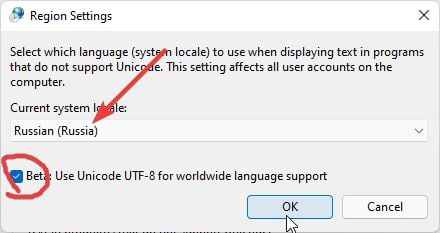
 ## Как исправить кракозябры?
 Включите русский язык по умолчанию в Параметры -> "Time&Language" -> "Language" -> "Administrative language settings" -> "Язык программ, не поддерживающих Юникод" -> "Изменить язык системы..." -> "Russia"

 ## Как посмотреть последние файлы открытые на ПК?
```
%UserProfile%\AppData\Roaming\Microsoft\Windows\Recent
```
## Как включить режим бога панель управления (GodMode?)
Создайте папку с именем:
```
Settings.{ED7BA470-8E54-465E-825C-99712043E01C}
```
## Как посмотреть последние файлы открытые на ПК?
```
%UserProfile%\AppData\Roaming\Microsoft\Windows\Recent
```
## Как включить режим бога панель управления (GodMode?)
Создайте папку с именем:
```
Settings.{ED7BA470-8E54-465E-825C-99712043E01C}
```
🔗 Links
Реестр проводника:
- http://www.rusdoc.ru/material/os/win/reestr.shtml
- https://ss64.com/nt/syntax-reghacks.html
- http://centaz.narod.ru/winwork2.html
Памятка по командной строке (cmd.exe):
- https://ab57.ru/cmdlist.html
- https://renenyffenegger.ch/notes/Windows
- https://admx.help
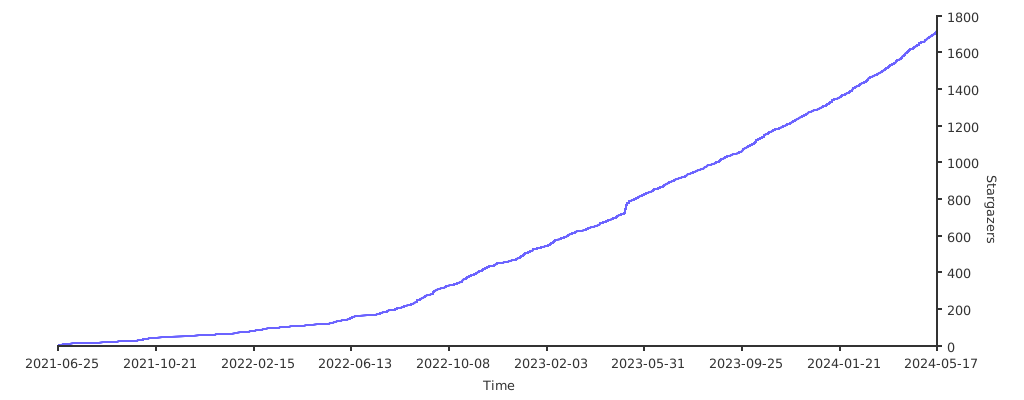
Stats
[](https://starchart.cc/awesome-windows11/windows11)
 | Изменить размер панели задач |
| [InputSwitch.zip](https://awesome-windows11.github.io/windows11/%D1%82%D0%B2%D0%B8%D0%BA%D0%B8/InputSwitch.zip)
| Изменить размер панели задач |
| [InputSwitch.zip](https://awesome-windows11.github.io/windows11/%D1%82%D0%B2%D0%B8%D0%BA%D0%B8/InputSwitch.zip)  Включите русский язык по умолчанию в Параметры -> "Time&Language" -> "Language" -> "Administrative language settings" -> "Язык программ, не поддерживающих Юникод" -> "Изменить язык системы..." -> "Russia"


 ## Как посмотреть последние файлы открытые на ПК?
```
%UserProfile%\AppData\Roaming\Microsoft\Windows\Recent
```
## Как включить режим бога панель управления (GodMode?)
Создайте папку с именем:
```
Settings.{ED7BA470-8E54-465E-825C-99712043E01C}
```
## Как посмотреть последние файлы открытые на ПК?
```
%UserProfile%\AppData\Roaming\Microsoft\Windows\Recent
```
## Как включить режим бога панель управления (GodMode?)
Создайте папку с именем:
```
Settings.{ED7BA470-8E54-465E-825C-99712043E01C}
```