Awesome Windows 11 (v3.8.0)
First help for setup, tweaks and ISO images
MORE PROJECTS: https://github.com/awesome-windows11
Site: https://windows12.glitch.me
VK: https://vk.com/flighthub
Telegram: https://t.me/windows11_chat
 Setup Windows
❗ Important
NT/SYSTEM console: https://github.com/gerardog/gsudo
https://github.com/microsoft/winget-cli
MBR to GPT (without data loss)
https://github.com/farag2/Utilities
HACK: Password Brute Force
✨ Portable Registrator
 Windows Defender
Defender Control
https://github.com/swagkarna/Defeat-Defender-V1.2
https://github.com/AndyFul/ConfigureDefender
 Windows Update
https://github.com/DavidXanatos/wumgr
https://github.com/WereDev/Wu10Man
 Microsoft Store Apps
https://github.com/Digressive/Remove-MS-Store-Apps
https://github.com/Sycnex/Windows10Debloater
✨ https://github.com/Fs00/Win10BloatRemover
✨ https://github.com/equk/windows
✨ https://github.com/r33int/Windows10-Postinstall
✨ https://github.com/simeononsecurity/Windows-Optimize-Harden-Debloa
✨ https://github.com/ChrisTitusTech/win10script
🛠 Tweaks (Win11)
Custom Context Menu
Windows Fixer
Old Start Menu
Start All Back
Explorer Patcher (Old TaskBar)
privacy.sexy
Windows 11 Guide
Twinkle Tray
☠ OUTDATED: Drag And Drop To Taskbar Fix
☠ OUTDATED: Windows Thumbnail Generator Folder
 PowerShell Tweaks (Scripts)
 Personalization
 Set Dark Theme
reg add "HKEY_CURRENT_USER\Software\Microsoft\Windows\CurrentVersion\Themes\Personalize" /v AppsUseLightTheme /t REG_DWORD /d 0 /f
reg add "HKEY_CURRENT_USER\Software\Microsoft\Windows\CurrentVersion\Themes\Personalize" /v SystemUsesLightTheme /t REG_DWORD /d 0 /f
reg add "HKEY_CURRENT_USER\Software\Microsoft\Windows\CurrentVersion\Themes\Personalize" /v EnableTransparency /t REG_DWORD /d 1 /f
pause
 Disable Change Wallpaper
reg add "HKEY_CURRENT_USER\Software\Microsoft\Windows\CurrentVersion\Policies\ActiveDesktop" /v NoChangingWallPaper /t REG_DWORD /d 1 /f
reg add "HKEY_LOCAL_MACHINE\Software\Microsoft\Windows\CurrentVersion\Policies\ActiveDesktop" /v NoChangingWallPaper /t REG_DWORD /d 1 /f
pause
Стандартно обои хранятся по пути:
C:\Windows\Web

 Disable LockScreen Spotlight
reg add "HKEY_CURRENT_USER\SOFTWARE\Policies\Microsoft\Windows\CloudContent" /v DisableWindowsSpotlightWindowsWelcomeExperience /t REG_DWORD /d 1 /f
reg add "HKEY_LOCAL_MACHINE\SOFTWARE\Policies\Microsoft\Windows\Personalization" /v NoChangingLockScreen /t REG_DWORD /d 0 /f
reg add "HKEY_CURRENT_USER\SOFTWARE\Policies\Microsoft\Windows\CloudContent" /v DisableWindowsSpotlightFeatures /t REG_DWORD /d 1 /f
reg add "HKEY_CURRENT_USER\SOFTWARE\Policies\Microsoft\Windows\CloudContent" /v DisableWindowsSpotlightOnActionCenter /t REG_DWORD /d 1 /f
reg add "HKEY_CURRENT_USER\SOFTWARE\Policies\Microsoft\Windows\CloudContent" /v DisableWindowsSpotlightOnSettings /t REG_DWORD /d 1 /f
reg add "HKEY_CURRENT_USER\SOFTWARE\Policies\Microsoft\Windows\CloudContent" /v DisableThirdPartySuggestions /t REG_DWORD /d 1 /f
reg add "HKEY_CURRENT_USER\SOFTWARE\Policies\Microsoft\Windows\CloudContent" /v ConfigureWindowsSpotlight /t REG_DWORD /d 2 /f
reg add "HKEY_CURRENT_USER\SOFTWARE\Policies\Microsoft\Windows\CloudContent" /v IncludeEnterpriseSpotlight /t REG_DWORD /d 0 /f
reg add "HKEY_CURRENT_USER\SOFTWARE\Microsoft\Windows\CurrentVersion\ContentDeliveryManager" /v "RotatingLockScreenEnabled" /t REG_DWORD /d 0 /f
reg add "HKEY_CURRENT_USER\SOFTWARE\Microsoft\Windows\CurrentVersion\ContentDeliveryManager" /v "LRotatingLockScreenEnabled" /t REG_DWORD /d 0 /f
reg add "HKEY_CURRENT_USER\SOFTWARE\Microsoft\Windows\CurrentVersion\ContentDeliveryManager" /v "RotatingLockScreenOverlayEnabled" /t REG_DWORD /d 0 /f
pause
 Clean Explorer
Force File Explorer to open to This PC instead of Quick Access
reg add "HKEY_CURRENT_USER\Software\Microsoft\Windows\CurrentVersion\Explorer\Advanced" /v LaunchTo /t REG_DWORD /d 1 /f
echo 3D Objects
reg add "HKEY_LOCAL_MACHINE\SOFTWARE\Microsoft\Windows\CurrentVersion\Explorer\FolderDescriptions\{31C0DD25-9439-4F12-BF41-7FF4EDA38722}\PropertyBag" /v ThisPCPolicy /t REG_SZ /d Hide /f
reg add "HKEY_LOCAL_MACHINE\SOFTWARE\Wow6432Node\Microsoft\Windows\CurrentVersion\Explorer\FolderDescriptions\{31C0DD25-9439-4F12-BF41-7FF4EDA38722}\PropertyBag" /v ThisPCPolicy /t REG_SZ /d Hide /f
echo Videos
reg add "HKEY_LOCAL_MACHINE\SOFTWARE\Microsoft\Windows\CurrentVersion\Explorer\FolderDescriptions\{35286a68-3c57-41a1-bbb1-0eae73d76c95}\PropertyBag" /v ThisPCPolicy /t REG_SZ /d Hide /f
reg add "HKEY_LOCAL_MACHINE\SOFTWARE\Wow6432Node\Microsoft\Windows\CurrentVersion\Explorer\FolderDescriptions\{35286a68-3c57-41a1-bbb1-0eae73d76c95}\PropertyBag" /v ThisPCPolicy /t REG_SZ /d Hide /f
echo Documents
reg add "HKEY_LOCAL_MACHINE\SOFTWARE\Microsoft\Windows\CurrentVersion\Explorer\FolderDescriptions\{f42ee2d3-909f-4907-8871-4c22fc0bf756}\PropertyBag" /v ThisPCPolicy /t REG_SZ /d Hide /f
reg add "HKEY_LOCAL_MACHINE\SOFTWARE\Wow6432Node\Microsoft\Windows\CurrentVersion\Explorer\FolderDescriptions\{f42ee2d3-909f-4907-8871-4c22fc0bf756}\PropertyBag" /v ThisPCPolicy /t REG_SZ /d Hide /f
echo Downloads
reg add "HKEY_LOCAL_MACHINE\SOFTWARE\Microsoft\Windows\CurrentVersion\Explorer\FolderDescriptions\{7d83ee9b-2244-4e70-b1f5-5393042af1e4}\PropertyBag" /v ThisPCPolicy /t REG_SZ /d Hide /f
reg add "HKEY_LOCAL_MACHINE\SOFTWARE\Wow6432Node\Microsoft\Windows\CurrentVersion\Explorer\FolderDescriptions\{7d83ee9b-2244-4e70-b1f5-5393042af1e4}\PropertyBag" /v ThisPCPolicy /t REG_SZ /d Hide /f
echo Images
reg add "HKEY_LOCAL_MACHINE\SOFTWARE\Microsoft\Windows\CurrentVersion\Explorer\FolderDescriptions\{0ddd015d-b06c-45d5-8c4c-f59713854639}\PropertyBag" /v ThisPCPolicy /t REG_SZ /d Hide /f
reg add "HKEY_LOCAL_MACHINE\SOFTWARE\Wow6432Node\Microsoft\Windows\CurrentVersion\Explorer\FolderDescriptions\{0ddd015d-b06c-45d5-8c4c-f59713854639}\PropertyBag" /v ThisPCPolicy /t REG_SZ /d Hide /f
echo Music
reg add "HKEY_LOCAL_MACHINE\SOFTWARE\Microsoft\Windows\CurrentVersion\Explorer\FolderDescriptions\{a0c69a99-21c8-4671-8703-7934162fcf1d}\PropertyBag" /v ThisPCPolicy /t REG_SZ /d Hide /f
reg add "HKEY_LOCAL_MACHINE\SOFTWARE\Wow6432Node\Microsoft\Windows\CurrentVersion\Explorer\FolderDescriptions\{a0c69a99-21c8-4671-8703-7934162fcf1d}\PropertyBag" /v ThisPCPolicy /t REG_SZ /d Hide /f
echo Desktop
reg add "HKEY_LOCAL_MACHINE\SOFTWARE\Microsoft\Windows\CurrentVersion\Explorer\FolderDescriptions\{B4BFCC3A-DB2C-424C-B029-7FE99A87C641}\PropertyBag" /v ThisPCPolicy /t REG_SZ /d Hide /f
reg add "HKEY_LOCAL_MACHINE\SOFTWARE\Wow6432Node\Microsoft\Windows\CurrentVersion\Explorer\FolderDescriptions\{B4BFCC3A-DB2C-424C-B029-7FE99A87C641}\PropertyBag" /v ThisPCPolicy /t REG_SZ /d Hide /f
taskkill /F /IM explorer.exe
start explorer.exe
pause
 Clean Taskbar
Edit Taskbar:
%UserProfile%\AppData\Roaming\Microsoft\Internet Explorer\Quick Launch\User Pinned\TaskBar
echo "Disable Meet Now"
reg add "HKEY_CURRENT_USER\Software\Microsoft\Windows\CurrentVersion\Policies\Explorer" /v HideSCAMeetNow /t REG_DWORD /d 1 /f
reg add "HKEY_LOCAL_MACHINE\SOFTWARE\Microsoft\Windows\CurrentVersion\Policies\Explorer" /v HideSCAMeetNow /t REG_DWORD /d 1 /f
echo "Disable People"
reg add "HKEY_LOCAL_MACHINE\SOFTWARE\Policies\Microsoft\Windows\Explorer" /v HidePeopleBar /t REG_DWORD /d 1 /f
reg add "HKEY_CURRENT_USER\Software\Policies\Microsoft\Windows\Explorer" /v HidePeopleBar /t REG_DWORD /d 1 /f
echo "Hide People"
reg add "HKEY_LOCAL_MACHINE\SOFTWARE\Microsoft\Windows\CurrentVersion\Explorer\Advanced\People" /v PeopleBand /t REG_DWORD /d 0 /f
echo "Disable Weather, News and Interests on taskbar"
reg add "HKEY_LOCAL_MACHINE\SOFTWARE\Policies\Microsoft\Windows\Windows Feeds" /v EnableFeeds /t REG_DWORD /d 0 /f
echo "Hide Weather, News and Interests on taskbar"
reg add "HKEY_LOCAL_MACHINE\SOFTWARE\Microsoft\Windows\CurrentVersion\Feeds" /v ShellFeedsTaskbarViewMode /t REG_DWORD /d 2 /f
pause
 Clean Settings
reg add "HKEY_LOCAL_MACHINE\SOFTWARE\Microsoft\Windows\CurrentVersion\Policies\Explorer" /v AllowOnlineTips /t REG_DWORD /d 0 /f
pause
 Edit StartMenu
StartMenu Global:
C:\ProgramData\Microsoft\Windows\Start Menu\Programs
StartMenu Local:
%UserProfile%\AppData\Roaming\Microsoft\Windows\Start Menu\Programs
 Adding App to the Context Menu
reg add "HKEY_CLASSES_ROOT\Directory\Background\shell\VScode" /ve /d "&VScode" /f
reg add "HKEY_CLASSES_ROOT\Directory\Background\shell\VScode\command" /ve /d "D:\Apps\VSCode\code.exe" /f
pause
🎨 Icons
Пак всех иконок из Windows 11
shell32.dll - оригинальный файл из папки System32 в Windows 11

🛠 Apps
 Remove and Disable Windows PC Health Check
reg add "HKEY_LOCAL_MACHINE\SOFTWARE\Microsoft\PCHC" /v PreviousUninstall /t REG_DWORD /d 1 /f
reg add "HKEY_LOCAL_MACHINE\SOFTWARE\Microsoft\PCHealthCheck" /v installed /t REG_DWORD /d 1 /f
Restore Microsoft Store Apps
WindowsStore
Get-AppXPackage *WindowsStore* -AllUsers | Foreach {Add-AppxPackage -DisableDevelopmentMode -Register “$($_.InstallLocation)\AppXManifest.xml”}
OR
wsreset.exe -i
AppInstaller (winget)
Get-AppXPackage *AppInstaller* -AllUsers | Foreach {Add-AppxPackage -DisableDevelopmentMode -Register “$($_.InstallLocation)\AppXManifest.xml”}
WindowsTerminal
Get-AppXPackage *WindowsTerminal* -AllUsers | Foreach {Add-AppxPackage -DisableDevelopmentMode -Register “$($_.InstallLocation)\AppXManifest.xml”}
Notepad
Get-AppXPackage *Notepad* -AllUsers | Foreach {Add-AppxPackage -DisableDevelopmentMode -Register “$($_.InstallLocation)\AppXManifest.xml”}
Gadgets
Get-AppXPackage *Windows.Client.WebExperience* -AllUsers | Foreach {Add-AppxPackage -DisableDevelopmentMode -Register “$($_.InstallLocation)\AppXManifest.xml”}
Remove Microsoft Store Apps
WindowsPhone
Get-AppxPackage *YourPhone* | Remove-AppxPackage
Get-AppxPackage -allusers *YourPhone* | Remove-AppxPackage
Get-AppxProvisionedPackage –online | where-object {$_.packagename –like "*YourPhone*"} | Remove-AppxProvisionedPackage –online
AppInstaller (winget)
Get-AppxPackage *AppInstaller* | Remove-AppxPackage
Get-AppxPackage -allusers *AppInstaller* | Remove-AppxPackage
Get-AppxProvisionedPackage –online | where-object {$_.packagename –like "*AppInstaller*"} | Remove-AppxProvisionedPackage –online
WindowsTerminal
Get-AppxPackage *WindowsTerminal* | Remove-AppxPackage
Get-AppxPackage -allusers *WindowsTerminal* | Remove-AppxPackage
Get-AppxProvisionedPackage –online | where-object {$_.packagename –like "*WindowsTerminal*"} | Remove-AppxProvisionedPackage –online
Notepad
Get-AppxPackage *Notepad* | Remove-AppxPackage
Get-AppxPackage -allusers *Notepad* | Remove-AppxPackage
Get-AppxProvisionedPackage –online | where-object {$_.packagename –like "*Notepad*"} | Remove-AppxProvisionedPackage –online
Gadgets
Get-AppxPackage *Windows.Client.WebExperience* | Remove-AppxPackage
Get-AppxPackage -allusers *Windows.Client.WebExperience* | Remove-AppxPackage
Get-AppxProvisionedPackage –online | where-object {$_.packagename –like "*Windows.Client.WebExperience*"} | Remove-AppxProvisionedPackage –online
Remove ALL Microsoft Store Apps (NOT Microsoft Store)
Get-AppxPackage -AllUsers | where-object {$_.name –notlike "*store*"} | Remove-AppxPackage
Remove ALL Microsoft Store Apps
Get-AppxPackage | Remove-AppxPackage


 VsCode Default Editor
Сделать VScode Portable редактором по умолчанию
Warning
Смените путь к редактору на свой! (по умолчаниюE:\VScode)

# "Default Path: E:\VSCode"
# "https://medium.com/@fawwazyusran/create-a-portable-ide-with-visual-studio-code-fb0c6bc198ef"

reg add "HKEY_CLASSES_ROOT\*\shell\Custom\shell\VsCode" /ve /d "Edit with VSCode" /f
reg add "HKEY_CLASSES_ROOT\*\shell\Custom\shell\VsCode" /v Icon /d "E:\VSCode\Code.exe,0" /f
reg add "HKEY_CLASSES_ROOT\*\shell\Custom\shell\VsCode\command" /ve /d "\"E:\VSCode\Code.exe\" "\"%1\" /f

# "This will make it appear when you right click ON a folder"
# "The "Icon" line can be removed if you don't want the icon to appear"

reg add "HKEY_CLASSES_ROOT\Directory\shell\vscode" /ve /d "Open Folder as VS Code Project" /f
reg add "HKEY_CLASSES_ROOT\Directory\shell\vscode" /v Icon /d "E:\VSCode\Code.exe,0" /f
reg add "HKEY_CLASSES_ROOT\Directory\shell\vscode\command" /ve /d "\"E:\VSCode\Code.exe\" "\"%1\" /f

# "This will make it appear when you right click INSIDE a folder"
# "The Icon line can be removed if you don't want the icon to appear"

reg add "HKEY_CLASSES_ROOT\Directory\Background\shell\vscode" /ve /d "Open Folder in VS Code Project" /f
reg add "HKEY_CLASSES_ROOT\Directory\shell\vscode" /v Icon /d "E:\VSCode\Code.exe,0" /f
reg add "HKEY_CLASSES_ROOT\Directory\Background\shell\vscode\command" /ve /d "\"E:\VSCode\Code.exe\" "\"%V\" /f
📜 Policies
Disable Windows Defender
Source: https://admx.help/HKLM/Software/Policies
Warning
Установите перед использованием gsudo!
gsudo -s powershell.exe
# "Disable Windows Defender"
reg add "HKEY_LOCAL_MACHINE\SOFTWARE\Policies\Microsoft\Windows Defender" /v DisableAntiSpyware /t REG_DWORD /d 1 /f
reg add "HKEY_LOCAL_MACHINE\SOFTWARE\Policies\Microsoft\Windows Defender" /v DisableRealtimeMonitoring /t REG_DWORD /d 1 /f
reg add "HKEY_LOCAL_MACHINE\SOFTWARE\Policies\Microsoft\Windows Defender" /v DisableAntiVirus /t REG_DWORD /d 1 /f
reg add "HKEY_LOCAL_MACHINE\SOFTWARE\Policies\Microsoft\Windows Defender" /v DisableSpecialRunningModes /t REG_DWORD /d 1 /f
reg add "HKEY_LOCAL_MACHINE\SOFTWARE\Policies\Microsoft\Windows Defender" /v DisableRoutinelyTakingAction /t REG_DWORD /d 1 /f
reg add "HKEY_LOCAL_MACHINE\SOFTWARE\Policies\Microsoft\Windows Defender" /v ServiceKeepAlive /t REG_DWORD /d 0 /f
# "Disable RealTimeProtection"
reg add "HKEY_LOCAL_MACHINE\SOFTWARE\Policies\Microsoft\Windows Defender\Real-Time Protection" /v DisableBehaviorMonitoring /t REG_DWORD /d 1 /f
# "Disable AccessProtection"
reg add "HKEY_LOCAL_MACHINE\SOFTWARE\Policies\Microsoft\Windows Defender\Real-Time Protection" /v DisableOnAccessProtection /t REG_DWORD /d 1 /f
# "Disable ScanProcess"
reg add "HKEY_LOCAL_MACHINE\SOFTWARE\Policies\Microsoft\Windows Defender\Real-Time Protection" /v DisableScanOnRealtimeEnable /t REG_DWORD /d 1 /f
# "Disable ScanDownloadFiles"
reg add "HKEY_LOCAL_MACHINE\SOFTWARE\Policies\Microsoft\Windows Defender\Real-Time Protection" /v DisableIOAVProtection /t REG_DWORD /d 1 /f
# "Disable VirusNotification"
reg add "HKEY_LOCAL_MACHINE\SOFTWARE\Policies\Microsoft\Windows Defender\Real-Time Protection" /v DisableRealtimeMonitoring /t REG_DWORD /d 1 /f
# "Disable AppControl (Windows Store)"
reg add "HKEY_LOCAL_MACHINE\SOFTWARE\Policies\Microsoft\Windows Defender\SmartScreen" /v ConfigureAppInstallControlEnabled /t REG_DWORD /d 0 /f
reg add "HKEY_LOCAL_MACHINE\SOFTWARE\Policies\Microsoft\Windows Defender\Signature Updates" /v ForceUpdateFromMU /t REG_DWORD /d 0 /f
reg add "HKEY_LOCAL_MACHINE\SOFTWARE\Policies\Microsoft\Windows Defender\Spynet" /v DisableBlockAtFirstSeen /t REG_DWORD /d 1 /f
# "Disable automatic sample submission and Spynet community membership"
reg add "HKEY_LOCAL_MACHINE\SOFTWARE\Policies\Microsoft\Windows Defender\Spynet" /v SubmitSamplesConsent /t REG_DWORD /d 2 /f
reg add "HKEY_LOCAL_MACHINE\SOFTWARE\Policies\Microsoft\Windows Defender\Spynet" /v SpynetReporting /t REG_DWORD /d 0 /f
# "Disable TamperProtection"
reg add "HKEY_LOCAL_MACHINE\SOFTWARE\Microsoft\Windows Defender\Features" /v TamperProtection /t REG_DWORD /d 0 /f
reg add "HKEY_LOCAL_MACHINE\SOFTWARE\Microsoft\Windows Defender" /v ServiceStartStates /t REG_DWORD /d 1 /f
reg add "HKEY_LOCAL_MACHINE\SOFTWARE\Microsoft\Windows Defender" /v DisableAntiSpyware /t REG_DWORD /d 1 /f
reg add "HKEY_LOCAL_MACHINE\SOFTWARE\Microsoft\Windows Defender" /v DisableAntiVirus /t REG_DWORD /d 1 /f
pause
Disable Windows Update
Warning
Установите перед использованием gsudo!
# "Disable OS Upgrade"
reg add "HKEY_LOCAL_MACHINE\SOFTWARE\Policies\Microsoft\Windows\WindowsUpdate" /v DisableOSUpgrade /t REG_DWORD /d 1 /f
# "Disable Scanning, Downloading and Installing Updates"
reg add "HKEY_LOCAL_MACHINE\SOFTWARE\Policies\Microsoft\Windows\WindowsUpdate" /v SetDisableUXWUAccess /t REG_DWORD /d 1 /f
# "Disable AutoUpdate"
reg add "HKEY_LOCAL_MACHINE\SOFTWARE\Policies\Microsoft\Windows\WindowsUpdate\AU" /v NoAutoUpdate /t REG_DWORD /d 1 /f
# "Enable NotificationUpdate"
reg add "HKEY_LOCAL_MACHINE\SOFTWARE\Policies\Microsoft\Windows\WindowsUpdate\AU" /v AUOptions /t REG_DWORD /d 2 /f
# "Scheduled Every Day (AUOptions = 4!)"
reg add "HKEY_LOCAL_MACHINE\SOFTWARE\Policies\Microsoft\Windows\WindowsUpdate\AU" /v ScheduledInstallDay /t REG_DWORD /d 0 /f
# "Scheduled Time Hour (0 -> 23)"
reg add "HKEY_LOCAL_MACHINE\SOFTWARE\Policies\Microsoft\Windows\WindowsUpdate\AU" /v ScheduledInstallTime /t REG_DWORD /d 3 /f
# "Disable AutoInstall Drivers"
reg add "HKEY_LOCAL_MACHINE\SOFTWARE\Microsoft\Windows\CurrentVersion\DriverSearching" /v SearchOrderConfig /t REG_DWORD /d 0 /f
pause
Disable Apps Microsoft Store AutoUpdate and Force Install
# "Disable AutoUpdate Apps Microsoft Store"
reg add "HKEY_LOCAL_MACHINE\SOFTWARE\Policies\Microsoft\Windows\CloudContent" /v DisableWindowsConsumerFeatures /t REG_DWORD /d 1 /f
# "Block the automatic installation of suggested Windows 10 apps"
reg add "HKEY_CURRENT_USER\Software\Microsoft\Windows\CurrentVersion\ContentDeliveryManager" /v SilentInstalledAppsEnabled /t REG_DWORD /d 0 /f
# "Disable Showing App Suggestions in Start in Windows 10 (settings app)"
reg add "HKEY_CURRENT_USER\SOFTWARE\Microsoft\Windows\CurrentVersion\ContentDeliveryManager" /v SubscribedContent-338388Enabled /t REG_DWORD /d 0 /f
# "Disable OEM Apps"
reg add "HKEY_CURRENT_USER\SOFTWARE\Microsoft\Windows\CurrentVersion\ContentDeliveryManager" /v OemPreInstalledAppsEnabled /t REG_DWORD /d 0 /f
# "Disable Promotional Apps"
reg add "HKEY_CURRENT_USER\SOFTWARE\Microsoft\Windows\CurrentVersion\ContentDeliveryManager" /v PreInstalledAppsEnabled /t REG_DWORD /d 0 /f
pause
 Disable Cortana
# "Disable Cloud Search"
reg add "HKEY_LOCAL_MACHINE\SOFTWARE\Policies\Microsoft\Windows\Windows Search" /v AllowCloudSearch /t REG_DWORD /d 0 /f
# "Disable Cortana"
reg add "HKEY_LOCAL_MACHINE\SOFTWARE\Policies\Microsoft\Windows\Windows Search" /v AllowCortana /t REG_DWORD /d 0 /f
# "Disable Cortana LockScreen"
reg add "HKEY_LOCAL_MACHINE\SOFTWARE\Policies\Microsoft\Windows\Windows Search" /v AllowCortanaAboveLock /t REG_DWORD /d 0 /f
# "Disable Cortana"
reg add "HKEY_CURRENT_USER\Software\Microsoft\Windows\CurrentVersion\Search" /v CortanaEnabled /t REG_DWORD /d 0 /f
# "Disable Cortana"
reg add "HKEY_CURRENT_USER\Software\Microsoft\Windows\CurrentVersion\Search" /v CortanaConsent /t REG_DWORD /d 0 /f
pause
 Microsoft Edge Lite (NOT Sync Microsoft Account)
reg add "HKEY_LOCAL_MACHINE\SOFTWARE\Policies\Microsoft\Edge" /v SyncDisabled /t REG_DWORD /d 1 /f
reg add "HKEY_LOCAL_MACHINE\SOFTWARE\Policies\Microsoft\Edge" /v BrowserSignin /t REG_DWORD /d 0 /f
reg add "HKEY_LOCAL_MACHINE\SOFTWARE\Policies\Microsoft\Edge" /v NewSmartScreenLibraryEnabled /t REG_DWORD /d 0 /f
reg add "HKEY_LOCAL_MACHINE\SOFTWARE\Policies\Microsoft\Edge" /v SmartScreenEnabled /t REG_DWORD /d 0 /f
reg add "HKEY_LOCAL_MACHINE\SOFTWARE\Policies\Microsoft\Edge" /v SmartScreenPuaEnabled /t REG_DWORD /d 0 /f
reg add "HKEY_LOCAL_MACHINE\SOFTWARE\Policies\Microsoft\Edge" /v StartupBoostEnabled /t REG_DWORD /d 0 /f
reg add "HKEY_LOCAL_MACHINE\SOFTWARE\Policies\Microsoft\Edge" /v BingAdsSuppression /t REG_DWORD /d 1 /f
reg add "HKEY_LOCAL_MACHINE\SOFTWARE\Policies\Microsoft\Edge" /v BackgroundModeEnabled /t REG_DWORD /d 0 /f
reg add "HKEY_LOCAL_MACHINE\SOFTWARE\Policies\Microsoft\Edge" /v ComponentUpdatesEnabled /t REG_DWORD /d 0 /f
reg add "HKEY_LOCAL_MACHINE\SOFTWARE\Policies\Microsoft\Edge" /v EdgeShoppingAssistantEnabled /t REG_DWORD /d 0 /f
reg add "HKEY_LOCAL_MACHINE\SOFTWARE\Policies\Microsoft\Edge" /v ForceGoogleSafeSearch /t REG_DWORD /d 1 /f
reg add "HKEY_LOCAL_MACHINE\SOFTWARE\Policies\Microsoft\Edge" /v MAUEnabled /t REG_DWORD /d 0 /f
reg add "HKEY_LOCAL_MACHINE\SOFTWARE\Policies\Microsoft\EdgeUpdate" /v AutoUpdateCheckPeriodMinutes /t REG_DWORD /d 0 /f
reg add "HKEY_LOCAL_MACHINE\SOFTWARE\Policies\Microsoft\EdgeUpdate" /v UpdateDefault /t REG_DWORD /d 0 /f
reg add "HKEY_LOCAL_MACHINE\SOFTWARE\Policies\Microsoft\EdgeUpdate" /v UpdatePolicy /t REG_DWORD /d 0 /f
reg add "HKEY_LOCAL_MACHINE\SOFTWARE\Microsoft" /v DoNotUpdateToEdgeWithChromium /t REG_DWORD /d 1 /f
pause
 Chrome Lite (NOT Security, etc.)
 Firefox Lite (NOT Sync Account, Pocket, etc.)
Win11
Switch Explorer (New, old)
New Explorer (Win11)
reg add "HKCU\Software\Microsoft\Windows\CurrentVersion\Explorer\Advanced" /v SeparateProcess /t REG_DWORD /d 0 /f
Old Explorer (Win10)
reg add "HKCU\Software\Microsoft\Windows\CurrentVersion\Explorer\Advanced" /v SeparateProcess /t REG_DWORD /d 1 /f
 TaskBar Layout (Top, bottom)

Change the location of the taskbar
Up TaskBar ⬆
reg add "HKEY_CURRENT_USER\Software\Microsoft\Windows\CurrentVersion\Explorer\StuckRects3" /v Settings /t REG_BINARY /d 30000000feffffff0200000001000000300000002000000000000000c203000080070000e20300006000000001000000 /f
Down TaskBar ⬇
reg add "HKEY_CURRENT_USER\Software\Microsoft\Windows\CurrentVersion\Explorer\StuckRects3" /v Settings /t REG_BINARY /d 30000000feffffff0200000003000000300000002000000000000000c203000080070000e20300006000000001000000 /f
Left TaskBar ⬅
Warning
Causes bugs, do not use!
reg add "HKEY_CURRENT_USER\Software\Microsoft\Windows\CurrentVersion\Explorer\StuckRects3" /v Settings /t REG_BINARY /d 30000000feffffff0200000000000000300000002000000000000000c203000080070000e20300006000000001000000 /f
Right TaskBar ➡
Warning
Causes bugs, do not use!
reg add "HKEY_CURRENT_USER\Software\Microsoft\Windows\CurrentVersion\Explorer\StuckRects3" /v Settings /t REG_BINARY /d 30000000feffffff0200000002000000300000002000000000000000c203000080070000e20300006000000001000000 /f
 ISO Windows
Download ISO
https://uupdump.net
https://tb.rg-adguard.net/public.php
https://uup.rg-adguard.net
Windows ISO Downloader
https://github.com/pbatard/Fido
⬇ Install ISO
❗ My files
Insider witout Microsoft Account: https://github.com/abbodi1406/offlineinsiderenroll
https://github.com/pbatard/rufus
https://github.com/ventoy/Ventoy
https://github.com/AveYo/MediaCreationTool.bat
Dism++: https://github.com/Chuyu-Team/Dism-Multi-language
WinNTSetup: http://wntsetup.ru
WinISO: https://rsload.net/soft/cleaner-disk/10195-winiso.html
Windows Insider Build ISO
Rectify11
BlissOS
💽 Bypass TPM
TPM: About, Installer, Bypass, FAQ
https://github.com/quickfever/Windows-11-Bypass-TPM
https://github.com/haithamaouati/BypassWin11
https://github.com/shirooo39/Windows-11-Bypass
https://github.com/rushiranpise/win11devbypass
https://github.com/FrancescoDiSalesGithub/TPM-windows11-hack
Boot, VHD (Virtual Disks)
https://rsload.net/soft/11768-easybcd.html
https://www.sordum.org/8705/simple-vhd-manager-v1-4
 Hash ISO
💿 Known ISO file hashes (check for originality)
https://msdn.rg-adguard.net
https://sha1.rg-adguard.net
https://www.heidoc.net/php/myvsdump_directory.php?letter=W
https://files.rg-adguard.net/version/f0bd8307-d897-ef77-dbd6-216fefbe94c5
https://github.com/AndrewRathbun/VanillaWindowsReference
Versions Windows
https://github.com/awesome-windows11/windows11/tree/main/version
https://changewindows.org/timeline/pc
Apps
 System Tools
 AutoRun
Hidden Apps AutoRun: https://www.nirsoft.net/utils/what_run_in_startup.html
AutoRuns: https://docs.microsoft.com/en-us/sysinternals/downloads/autoruns
Disk
Manager Partition
MiniTool Partition Wizard Free: https://www.partitionwizard.com/free-partition-manager.html
AOMEI Partition Assistant: https://www.diskpart.com/free-partition-manager.html
SSD Info
CrystalDiskInfo: https://crystalmark.info/en/download/#CrystalDiskInfo
CrystalDiskMark: https://crystalmark.info/en/download/#CrystalDiskMark
IsMyHdOK: https://www.softwareok.com/?Download=IsMyHdOK
Hard Disk Sentinel: https://www.hdsentinel.com/download.php
Victoria: https://hdd.by/victoria
ClearDiskInfo: https://www.carifred.com/cleardiskinfo
 Uninstaller
BCUninstaller: https://github.com/Klocman/Bulk-Crap-Uninstaller
UninstallTool: https://crystalidea.com/ru/uninstall-tool
 Management
SafeMode Launcher: https://www.sordum.org/12964/safe-mode-launcher-v1-1 Compressor CompactOS: https://github.com/IridiumIO/CompactGUI
🌎 Internet
qBittorrent: https://portableapps.com/apps/internet/qbittorrent_portable
URL Disabler: https://www.sordum.org/13075/url-disabler-v1-1


 Driver
Snappy Driver Installer: https://sdi-tool.org/download
G-Hub: https://www.logitechg.com/ru-ru/innovation/g-hub.html
Activators
🔓 Activator by Ratiborus
https://github.com/massgravel/Microsoft-Activation-Scripts
В AAct все операции с активацией, с лицензиями, выполняются с помощью стандартных скриптов slmgr.vbs и ospp.vbs, уж их то даже самый ненормальный антивирусник не заподозрит в "троянстве".
http://forum.ru-board.com/topic.cgi?forum=2&topic=5559
В чём отличие KMSAuto Net 2016 1.5.0 и Portable AAct?
Принципиальное отличие этих двух программ в том, что у первой для работы программы требуется .NET Framework 4.5 , а вот для второй НЕ требуется .NET Framework, работает на Windows XP - 10.С другой стороны KMSAuto Net имеет намного больше возможностей по настройке процесса активации, чем AAct и иногда позволяет решить проблемы с KMS-активацией там, где AAct не справляется. Или, если использовать автомобильную терминологию, первая программа является высокоэффективной ручной коробкой передач, позволяющей опытному водителю использовать ее возможности по максимуму, в то время как вторая программа является "автоматом", более подходящим для новичков и домохозяек.
User Tools
 Media (Photo, Video, Audio)
PaintNet: https://www.dotpdn.com/downloads/pdn.html
Open .ogg file: https://apps.microsoft.com/store/detail/web-media-extensions/9N5TDP8VCMHS
Windows Media Player: https://apps.microsoft.com/store/detail/windows-media-player/9WZDNCRFJ3PT
 Double-click mouse fix
Проверка
https://alexbruni.ru/checkmouse
https://codepen.io/blink172/pen/vERyxK
Исправить
https://www.clickfix.cf
https://www.softpedia.com/get/System/System-Miscellaneous/Left-Mouse-Button-Fix.shtml
📱 Win11 APK
APK Installer 1: An APK File Installer for WSA
APK Installer 2: WSATools
APK Installer 3: https://github.com/voletro/wsa-toolbox
Google Play Installer: https://github.com/ADeltaX/WSAGAScript
🔔 Compatibility check (Win11)
https://github.com/rcmaehl/WhyNotWin11
https://github.com/mq1n/Win11SysCheck
Tweaks
| Скачать | Описание |
|---|---|
TaskBarSize.bat  |
Изменить размер панели задач |
InputSwitch.zip  |
Отключить / включить всплывающую панель языка |
contextmenu.reg  |
Восстановить классические контекстные меню в масштабе всей системы |
❓ FAQ
# Как закрепить UWP на рабочий стол?
shell:AppsFolder
# Посмотреть все приложения UWP
Get-AppxPackage –AllUsers | Select Name, PackageFullName
# Полная команда, для подробного анализа
Get-AppxPackage –AllUsers


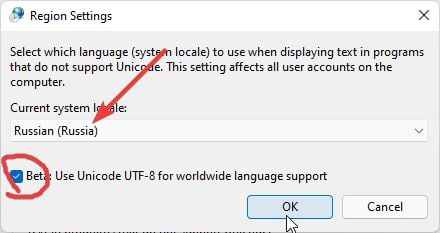
Как исправить кракозябры?

Включите русский язык по умолчанию в Параметры -> "Time&Language" -> "Language" -> "Administrative language settings" -> "Язык программ, не поддерживающих Юникод" -> "Изменить язык системы..." -> "Russia"


Как посмотреть последние файлы открытые на ПК?
%UserProfile%\AppData\Roaming\Microsoft\Windows\Recent
Как включить режим бога панель управления (GodMode?)
Создайте папку с именем:
Settings.{ED7BA470-8E54-465E-825C-99712043E01C}
🔗 Links
Реестр проводника:
- http://www.rusdoc.ru/material/os/win/reestr.shtml
- https://ss64.com/nt/syntax-reghacks.html
- http://centaz.narod.ru/winwork2.html
Памятка по командной строке (cmd.exe):
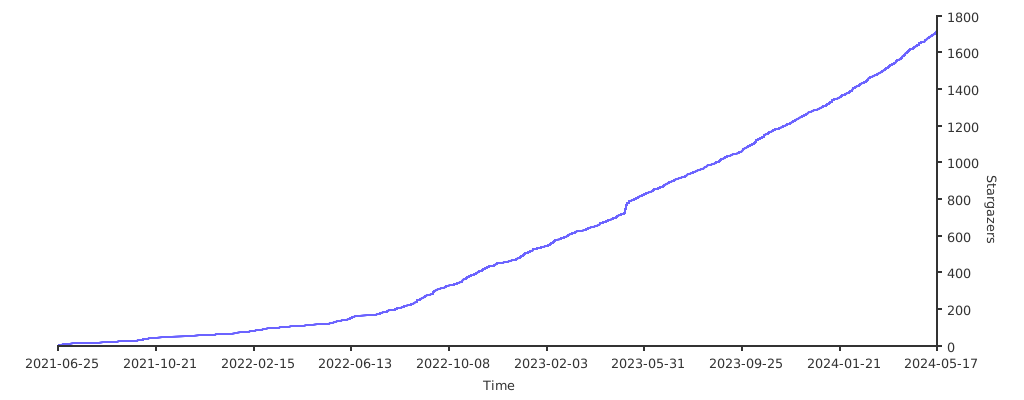
Stats