Awesome Windows 11 (v3.0.0)
First help for setup, tweaks and ISO images
ISO: https://github.com/awesome-windows11/windows11/wiki/%F0%9F%92%BF-ISO
Site: https://windows12.glitch.me
VK: https://vk.com/flighthub
Telegram: https://t.me/windows11_insider
Windows 10
❗ Important Apps
Gsudo (NT/SYSTEM console)
Hidden Apps AutoRun
AppInstaller (winget)
OfflineInsider (Windows Insider witout Microsoft Account)
Utilities
Other:
HACK: Password Brute Force
Activation Scripts
🧰 SafeMode Launcher
🗑 BulkCrap Uninstaller
✨ Portable Registrator
🛠 Tweaks
🛡 Defender Control
🛡 Defeat Defender
🛡 Configure Defender
🔄 Windows Update Manager for Windows (WuMgr)
🔄 Wu10Man
🗃 Remove MS Store Apps
🗃 UWP Windows 10 Debloater
✨ Win10 Bloat Remover
✨ Equk
✨ Windows10 PostInstall
✨ Windows Optimize Harden Debloat
⬇ Downloading and Installing:
UupDump.net
❗ My files
Ventoy
Fido
MediaCreationTool.bat
Windows Insider Build ISO
Rectify11
BlissOS
Windows 11
🛠 Tweaks
Custom Context Menu
Windows Fixer
Old Start Menu
Start All Back
Explorer Patcher (Old TaskBar)
☠ OUTDATED: Drag And Drop To Taskbar Fix
☠ OUTDATED: Windows Thumbnail Generator Folder
Android APK
An APK File Installer for WSA (APK Installer 1)
WSATools (APK Installer 2)
Wsa Toolbox (APK Installer 3)
WSAGAScript (Google Play Installer)
Compatibility check
PowerShell Tweaks (Scripts)
🖼 Personalization
🌑 Dark Theme: 0 | ☀️ Light Theme: 1
reg add "HKEY_CURRENT_USER\Software\Microsoft\Windows\CurrentVersion\Themes\Personalize" /v AppsUseLightTheme /t REG_DWORD /d 0 /f
reg add "HKEY_CURRENT_USER\Software\Microsoft\Windows\CurrentVersion\Themes\Personalize" /v SystemUsesLightTheme /t REG_DWORD /d 0 /f
reg add "HKEY_CURRENT_USER\Software\Microsoft\Windows\CurrentVersion\Themes\Personalize" /v EnableTransparency /t REG_DWORD /d 1 /f
pause
🧹 Clean Explorer
echo 3D Objects
reg add "HKEY_LOCAL_MACHINE\SOFTWARE\Microsoft\Windows\CurrentVersion\Explorer\FolderDescriptions\{31C0DD25-9439-4F12-BF41-7FF4EDA38722}\PropertyBag" /v ThisPCPolicy /t REG_SZ /d Hide /f
reg add "HKEY_LOCAL_MACHINE\SOFTWARE\Wow6432Node\Microsoft\Windows\CurrentVersion\Explorer\FolderDescriptions\{31C0DD25-9439-4F12-BF41-7FF4EDA38722}\PropertyBag" /v ThisPCPolicy /t REG_SZ /d Hide /f
echo Videos
reg add "HKEY_LOCAL_MACHINE\SOFTWARE\Microsoft\Windows\CurrentVersion\Explorer\FolderDescriptions\{35286a68-3c57-41a1-bbb1-0eae73d76c95}\PropertyBag" /v ThisPCPolicy /t REG_SZ /d Hide /f
reg add "HKEY_LOCAL_MACHINE\SOFTWARE\Wow6432Node\Microsoft\Windows\CurrentVersion\Explorer\FolderDescriptions\{35286a68-3c57-41a1-bbb1-0eae73d76c95}\PropertyBag" /v ThisPCPolicy /t REG_SZ /d Hide /f
echo Documents
reg add "HKEY_LOCAL_MACHINE\SOFTWARE\Microsoft\Windows\CurrentVersion\Explorer\FolderDescriptions\{f42ee2d3-909f-4907-8871-4c22fc0bf756}\PropertyBag" /v ThisPCPolicy /t REG_SZ /d Hide /f
reg add "HKEY_LOCAL_MACHINE\SOFTWARE\Wow6432Node\Microsoft\Windows\CurrentVersion\Explorer\FolderDescriptions\{f42ee2d3-909f-4907-8871-4c22fc0bf756}\PropertyBag" /v ThisPCPolicy /t REG_SZ /d Hide /f
echo Downloads
reg add "HKEY_LOCAL_MACHINE\SOFTWARE\Microsoft\Windows\CurrentVersion\Explorer\FolderDescriptions\{7d83ee9b-2244-4e70-b1f5-5393042af1e4}\PropertyBag" /v ThisPCPolicy /t REG_SZ /d Hide /f
reg add "HKEY_LOCAL_MACHINE\SOFTWARE\Wow6432Node\Microsoft\Windows\CurrentVersion\Explorer\FolderDescriptions\{7d83ee9b-2244-4e70-b1f5-5393042af1e4}\PropertyBag" /v ThisPCPolicy /t REG_SZ /d Hide /f
echo Images
reg add "HKEY_LOCAL_MACHINE\SOFTWARE\Microsoft\Windows\CurrentVersion\Explorer\FolderDescriptions\{0ddd015d-b06c-45d5-8c4c-f59713854639}\PropertyBag" /v ThisPCPolicy /t REG_SZ /d Hide /f
reg add "HKEY_LOCAL_MACHINE\SOFTWARE\Wow6432Node\Microsoft\Windows\CurrentVersion\Explorer\FolderDescriptions\{0ddd015d-b06c-45d5-8c4c-f59713854639}\PropertyBag" /v ThisPCPolicy /t REG_SZ /d Hide /f
echo Music
reg add "HKEY_LOCAL_MACHINE\SOFTWARE\Microsoft\Windows\CurrentVersion\Explorer\FolderDescriptions\{a0c69a99-21c8-4671-8703-7934162fcf1d}\PropertyBag" /v ThisPCPolicy /t REG_SZ /d Hide /f
reg add "HKEY_LOCAL_MACHINE\SOFTWARE\Wow6432Node\Microsoft\Windows\CurrentVersion\Explorer\FolderDescriptions\{a0c69a99-21c8-4671-8703-7934162fcf1d}\PropertyBag" /v ThisPCPolicy /t REG_SZ /d Hide /f
echo Desktop
reg add "HKEY_LOCAL_MACHINE\SOFTWARE\Microsoft\Windows\CurrentVersion\Explorer\FolderDescriptions\{B4BFCC3A-DB2C-424C-B029-7FE99A87C641}\PropertyBag" /v ThisPCPolicy /t REG_SZ /d Hide /f
reg add "HKEY_LOCAL_MACHINE\SOFTWARE\Wow6432Node\Microsoft\Windows\CurrentVersion\Explorer\FolderDescriptions\{B4BFCC3A-DB2C-424C-B029-7FE99A87C641}\PropertyBag" /v ThisPCPolicy /t REG_SZ /d Hide /f
taskkill /F /IM explorer.exe
start explorer.exe
pause
🎨 Editor Start Menu
Global:
C:\ProgramData\Microsoft\Windows\Start Menu\Programs
Local:
%UserProfile%\AppData\Roaming\Microsoft\Windows\Start Menu\Programs
🛠 Apps
🔽 Restore UWP
WindowsStore
Get-AppXPackage *WindowsStore* -AllUsers | Foreach {Add-AppxPackage -DisableDevelopmentMode -Register “$($_.InstallLocation)\AppXManifest.xml”}
OR
wsreset.exe -i
AppInstaller (winget)
Get-AppXPackage *AppInstaller* -AllUsers | Foreach {Add-AppxPackage -DisableDevelopmentMode -Register “$($_.InstallLocation)\AppXManifest.xml”}
WindowsTerminal
Get-AppXPackage *WindowsTerminal* -AllUsers | Foreach {Add-AppxPackage -DisableDevelopmentMode -Register “$($_.InstallLocation)\AppXManifest.xml”}
Notepad
Get-AppXPackage *Notepad* -AllUsers | Foreach {Add-AppxPackage -DisableDevelopmentMode -Register “$($_.InstallLocation)\AppXManifest.xml”}
Gadgets
Get-AppXPackage *Windows.Client.WebExperience* -AllUsers | Foreach {Add-AppxPackage -DisableDevelopmentMode -Register “$($_.InstallLocation)\AppXManifest.xml”}
🗑 Remove UWP
WindowsPhone
Get-AppxPackage *YourPhone* | Remove-AppxPackage
Get-AppxPackage -allusers *YourPhone* | Remove-AppxPackage
Get-AppxProvisionedPackage –online | where-object {$_.packagename –like "*YourPhone*"} | Remove-AppxProvisionedPackage –online
AppInstaller (winget)
Get-AppxPackage *AppInstaller* | Remove-AppxPackage
Get-AppxPackage -allusers *AppInstaller* | Remove-AppxPackage
Get-AppxProvisionedPackage –online | where-object {$_.packagename –like "*AppInstaller*"} | Remove-AppxProvisionedPackage –online
WindowsTerminal
Get-AppxPackage *WindowsTerminal* | Remove-AppxPackage
Get-AppxPackage -allusers *WindowsTerminal* | Remove-AppxPackage
Get-AppxProvisionedPackage –online | where-object {$_.packagename –like "*WindowsTerminal*"} | Remove-AppxProvisionedPackage –online
Notepad
Get-AppxPackage *Notepad* | Remove-AppxPackage
Get-AppxPackage -allusers *Notepad* | Remove-AppxPackage
Get-AppxProvisionedPackage –online | where-object {$_.packagename –like "*Notepad*"} | Remove-AppxProvisionedPackage –online
Gadgets
Get-AppxPackage *Windows.Client.WebExperience* | Remove-AppxPackage
Get-AppxPackage -allusers *Windows.Client.WebExperience* | Remove-AppxPackage
Get-AppxProvisionedPackage –online | where-object {$_.packagename –like "*Windows.Client.WebExperience*"} | Remove-AppxProvisionedPackage –online
🗑 Remove ALL UWP (NOT WindowsStore)
Get-AppxPackage -AllUsers | where-object {$_.name –notlike "*store*"} | Remove-AppxPackage
🗑 Remove ALL UWP
Get-AppxPackage | Remove-AppxPackage


📜 Policies
🗃 Disable Windows Defender
Source: https://admx.help/HKLM/Software/Policies
echo "Disable Windows Defender"
reg add "HKEY_LOCAL_MACHINE\SOFTWARE\Policies\Microsoft\Windows Defender" /v DisableAntiSpyware /t REG_DWORD /d 1 /f
reg add "HKEY_LOCAL_MACHINE\SOFTWARE\Policies\Microsoft\Windows Defender" /v DisableRealtimeMonitoring /t REG_DWORD /d 1 /f
reg add "HKEY_LOCAL_MACHINE\SOFTWARE\Policies\Microsoft\Windows Defender" /v DisableAntiVirus /t REG_DWORD /d 1 /f
reg add "HKEY_LOCAL_MACHINE\SOFTWARE\Policies\Microsoft\Windows Defender" /v DisableSpecialRunningModes /t REG_DWORD /d 1 /f
reg add "HKEY_LOCAL_MACHINE\SOFTWARE\Policies\Microsoft\Windows Defender" /v DisableRoutinelyTakingAction /t REG_DWORD /d 1 /f
reg add "HKEY_LOCAL_MACHINE\SOFTWARE\Policies\Microsoft\Windows Defender" /v ServiceKeepAlive /t REG_DWORD /d 0 /f
echo "Disable RealTimeProtection"
reg add "HKEY_LOCAL_MACHINE\SOFTWARE\Policies\Microsoft\Windows Defender\Real-Time Protection" /v DisableBehaviorMonitoring /t REG_DWORD /d 1 /f
echo "Disable AccessProtection"
reg add "HKEY_LOCAL_MACHINE\SOFTWARE\Policies\Microsoft\Windows Defender\Real-Time Protection" /v DisableOnAccessProtection /t REG_DWORD /d 1 /f
echo "Disable ScanProcess"
reg add "HKEY_LOCAL_MACHINE\SOFTWARE\Policies\Microsoft\Windows Defender\Real-Time Protection" /v DisableScanOnRealtimeEnable /t REG_DWORD /d 1 /f
echo "Disable ScanDownloadFiles"
reg add "HKEY_LOCAL_MACHINE\SOFTWARE\Policies\Microsoft\Windows Defender\Real-Time Protection" /v DisableIOAVProtection /t REG_DWORD /d 1 /f
echo "Disable VirusNotification"
reg add "HKEY_LOCAL_MACHINE\SOFTWARE\Policies\Microsoft\Windows Defender\Real-Time Protection" /v DisableRealtimeMonitoring /t REG_DWORD /d 1 /f
echo "Disable AppControl (Windows Store)"
reg add "HKEY_LOCAL_MACHINE\SOFTWARE\Policies\Microsoft\Windows Defender\SmartScreen" /v ConfigureAppInstallControlEnabled /t REG_DWORD /d 0 /f
reg add "HKEY_LOCAL_MACHINE\SOFTWARE\Policies\Microsoft\Windows Defender\Signature Updates" /v ForceUpdateFromMU /t REG_DWORD /d 0 /f
reg add "HKEY_LOCAL_MACHINE\SOFTWARE\Policies\Microsoft\Windows Defender\Spynet" /v DisableBlockAtFirstSeen /t REG_DWORD /d 1 /f
echo "Disable TamperProtection"
reg add "HKEY_LOCAL_MACHINE\SOFTWARE\Microsoft\Windows Defender\Features" /v TamperProtection /t REG_DWORD /d 0 /f
reg add "HKEY_LOCAL_MACHINE\SOFTWARE\Microsoft\Windows Defender" /v ServiceStartStates /t REG_DWORD /d 1 /f
reg add "HKEY_LOCAL_MACHINE\SOFTWARE\Microsoft\Windows Defender" /v DisableAntiSpyware /t REG_DWORD /d 1 /f
reg add "HKEY_LOCAL_MACHINE\SOFTWARE\Microsoft\Windows Defender" /v DisableAntiVirus /t REG_DWORD /d 1 /f
🗃 Disable Windows Update
echo "Disable OS Upgrade"
reg add "HKEY_LOCAL_MACHINE\SOFTWARE\Policies\Microsoft\Windows\WindowsUpdate" /v DisableOSUpgrade /t REG_DWORD /d 1 /f
echo "Disable Scanning, Downloading and Installing Updates"
reg add "HKEY_LOCAL_MACHINE\SOFTWARE\Policies\Microsoft\Windows\WindowsUpdate" /v SetDisableUXWUAccess /t REG_DWORD /d 1 /f
echo "Disable AutoUpdate"
reg add "HKEY_LOCAL_MACHINE\SOFTWARE\Policies\Microsoft\Windows\WindowsUpdate\AU" /v NoAutoUpdate /t REG_DWORD /d 1 /f
echo "Enable NotificationUpdate"
reg add "HKEY_LOCAL_MACHINE\SOFTWARE\Policies\Microsoft\Windows\WindowsUpdate\AU" /v AUOptions /t REG_DWORD /d 2 /f
echo "Scheduled Every Day (AUOptions = 4!)"
reg add "HKEY_LOCAL_MACHINE\SOFTWARE\Policies\Microsoft\Windows\WindowsUpdate\AU" /v ScheduledInstallDay /t REG_DWORD /d 0 /f
echo "Scheduled Time Hour (0 -> 23)"
reg add "HKEY_LOCAL_MACHINE\SOFTWARE\Policies\Microsoft\Windows\WindowsUpdate\AU" /v ScheduledInstallTime /t REG_DWORD /d 3 /f
echo "Disable AutoInstall Drivers"
reg add "HKEY_LOCAL_MACHINE\SOFTWARE\Microsoft\Windows\CurrentVersion\DriverSearching" /v SearchOrderConfig /t REG_DWORD /d 0 /f
🗃 Microsoft Edge Lite (without sync Microsoft Account)
reg add "HKEY_LOCAL_MACHINE\SOFTWARE\Policies\Microsoft\Edge" /v SyncDisabled /t REG_DWORD /d 1 /f
reg add "HKEY_LOCAL_MACHINE\SOFTWARE\Policies\Microsoft\Edge" /v BrowserSignin /t REG_DWORD /d 0 /f
reg add "HKEY_LOCAL_MACHINE\SOFTWARE\Policies\Microsoft\Edge" /v NewSmartScreenLibraryEnabled /t REG_DWORD /d 0 /f
reg add "HKEY_LOCAL_MACHINE\SOFTWARE\Policies\Microsoft\Edge" /v SmartScreenEnabled /t REG_DWORD /d 0 /f
reg add "HKEY_LOCAL_MACHINE\SOFTWARE\Policies\Microsoft\Edge" /v SmartScreenPuaEnabled /t REG_DWORD /d 0 /f
reg add "HKEY_LOCAL_MACHINE\SOFTWARE\Policies\Microsoft\Edge" /v StartupBoostEnabled /t REG_DWORD /d 0 /f
reg add "HKEY_LOCAL_MACHINE\SOFTWARE\Policies\Microsoft\Edge" /v BingAdsSuppression /t REG_DWORD /d 1 /f
reg add "HKEY_LOCAL_MACHINE\SOFTWARE\Policies\Microsoft\Edge" /v BackgroundModeEnabled /t REG_DWORD /d 0 /f
reg add "HKEY_LOCAL_MACHINE\SOFTWARE\Policies\Microsoft\Edge" /v ComponentUpdatesEnabled /t REG_DWORD /d 0 /f
reg add "HKEY_LOCAL_MACHINE\SOFTWARE\Policies\Microsoft\Edge" /v EdgeShoppingAssistantEnabled /t REG_DWORD /d 0 /f
reg add "HKEY_LOCAL_MACHINE\SOFTWARE\Policies\Microsoft\Edge" /v ForceGoogleSafeSearch /t REG_DWORD /d 1 /f
reg add "HKEY_LOCAL_MACHINE\SOFTWARE\Policies\Microsoft\Edge" /v MAUEnabled /t REG_DWORD /d 0 /f
reg add "HKEY_LOCAL_MACHINE\SOFTWARE\Policies\Microsoft\EdgeUpdate" /v AutoUpdateCheckPeriodMinutes /t REG_DWORD /d 0 /f
reg add "HKEY_LOCAL_MACHINE\SOFTWARE\Policies\Microsoft\EdgeUpdate" /v UpdateDefault /t REG_DWORD /d 0 /f
reg add "HKEY_LOCAL_MACHINE\SOFTWARE\Policies\Microsoft\EdgeUpdate" /v UpdatePolicy /t REG_DWORD /d 0 /f
reg add "HKEY_LOCAL_MACHINE\SOFTWARE\Microsoft" /v DoNotUpdateToEdgeWithChromium /t REG_DWORD /d 1 /f
pause
Tweaks
| Скачать | Описание |
|---|---|
| ExplorerSwitch.bat | Переключение между старым и новым проводником |
TaskBarLayout.bat  |
Изменить расположение панели задач |
TaskBarSize.bat  |
Изменить размер панели задач |
InputSwitch.zip  |
Отключить / включить всплывающую панель языка |
contextmenu.reg  |
Восстановить классические контекстные меню в масштабе всей системы |
VsCodeDefault.reg 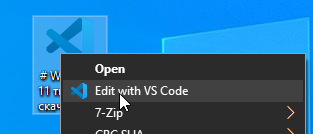 |
Сделать VScode Portable редактором по умолчанию Важно: смените путь к редактору на свой! (по умолчанию E:\VScode> |
❓ FAQ
# Как закрепить UWP на рабочий стол?
shell:AppsFolder
# Посмотреть все приложения UWP
Get-AppxPackage –AllUsers | Select Name, PackageFullName
# Полная команда, для подробного анализа
Get-AppxPackage –AllUsers


# Как удалить все приложения кроме нескольких N приложений?
Get-AppxPackage -AllUsers | where-object {$_.name -notlike "*NAME1*"} | where-object {$_.name -notlike "*NAME2*"} | where-object {$_.name -notlike "*NAME3*"} | Remove-AppxPackage
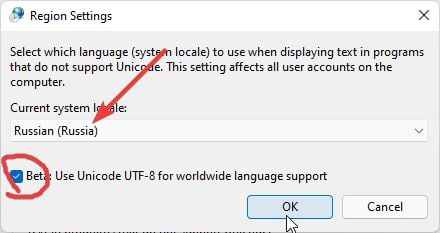
Как исправить кракозябры?

Включите русский язык по умолчанию в Параметры -> "Time&Language" -> "Language" -> "Administrative language settings" -> "Язык программ, не поддерживающих Юникод" -> "Изменить язык системы..." -> "Russia"


Как редактировать панель задач?
%UserProfile%\AppData\Roaming\Microsoft\Internet Explorer\Quick Launch\User Pinned\TaskBar
Как посмотреть последние файлы открытые на ПК?
%UserProfile%\AppData\Roaming\Microsoft\Windows\Recent
Как включить режим бога панель управления (GodMode?)
Создайте папку с именем:
Settings.{ED7BA470-8E54-465E-825C-99712043E01C}
Как сменить диск MBR в GPT (или наоборот) без потери данных?
Используйте инструмент pwfree9.iso
- Запишите ISO образ на флешку
- Загрузитесь с неё и выберите нужные диски
Инструкция: https://youtu.be/CQ0DUd1kyDs?t=133
🔗 Links
Реестр проводника:
- http://www.rusdoc.ru/material/os/win/reestr.shtml
- https://ss64.com/nt/syntax-reghacks.html
- http://centaz.narod.ru/winwork2.html
Памятка по командной строке (cmd.exe):
🖼 Wallpaper
Стандартно обои хранятся по пути:
C:\Windows\Web

🎨 Icons
Пак всех иконок из Windows 11
shell32.dll - оригинальный файл из папки System32 в Windows 11

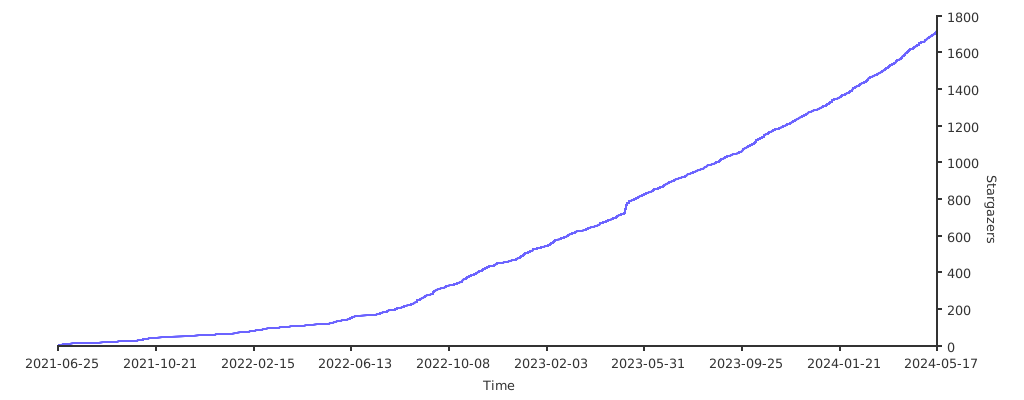
Stats