 Awesome Windows 11 (v3.5.0)
First help for setup, tweaks and ISO images
MORE PROJECTS: https://github.com/awesome-windows11
Site: https://windows12.glitch.me
VK: https://vk.com/flighthub
Telegram: https://t.me/windows11_insider
📚 Guides
💽 TPM: About, Installer, FAQ
💿 ISO: Windows Images, HASH File
Windows 10
❗ Important Apps
Gsudo (NT/SYSTEM console)
Hidden Apps AutoRun
AppInstaller (winget)
OfflineInsider (Windows Insider witout Microsoft Account)
Utilities
Other:
HACK: Password Brute Force
Activation Scripts
🧰 SafeMode Launcher
🗑 BulkCrap Uninstaller
✨ Portable Registrator
🛠 Tweaks
🛡 Defender Control
🛡 Defeat Defender
🛡 Configure Defender
🔄 Windows Update Manager for Windows (WuMgr)
🔄 Wu10Man
🗃 Remove MS Store Apps
🗃 UWP Windows 10 Debloater
✨ Win10 Bloat Remover
✨ Equk
✨ Windows10 PostInstall
✨ Windows Optimize Harden Debloat
✨ Chris Titus Tech
⬇ Downloading and Installing:
https://tb.rg-adguard.net/public.php?lang=ru-RU
https://uup.rg-adguard.net/
UupDump.net
Windows ISO Downloader
❗ My files
Ventoy
Fido
MediaCreationTool.bat
Windows Insider Build ISO
Rectify11
BlissOS
Windows 11
🛠 Tweaks
Custom Context Menu
Windows Fixer
Old Start Menu
Start All Back
Explorer Patcher (Old TaskBar)
☠ OUTDATED: Drag And Drop To Taskbar Fix
☠ OUTDATED: Windows Thumbnail Generator Folder
☎ Android APK
📱 An APK File Installer for WSA (APK Installer 1)
📱 WSATools (APK Installer 2)
📱 Wsa Toolbox (APK Installer 3)
WSAGAScript (Google Play Installer)
🔔 Compatibility check
PowerShell Tweaks (Scripts)
🖼 Personalization
🌑 Dark Theme: 0 | ☀️ Light Theme: 1
reg add "HKEY_CURRENT_USER\Software\Microsoft\Windows\CurrentVersion\Themes\Personalize" /v AppsUseLightTheme /t REG_DWORD /d 0 /f
reg add "HKEY_CURRENT_USER\Software\Microsoft\Windows\CurrentVersion\Themes\Personalize" /v SystemUsesLightTheme /t REG_DWORD /d 0 /f
reg add "HKEY_CURRENT_USER\Software\Microsoft\Windows\CurrentVersion\Themes\Personalize" /v EnableTransparency /t REG_DWORD /d 1 /f
pause
🧹 Clean Taskbar
echo "Disable Meet Now"
reg add "HKEY_CURRENT_USER\Software\Microsoft\Windows\CurrentVersion\Policies\Explorer" /v HideSCAMeetNow /t REG_DWORD /d 1 /f
reg add "HKEY_LOCAL_MACHINE\SOFTWARE\Microsoft\Windows\CurrentVersion\Policies\Explorer" /v HideSCAMeetNow /t REG_DWORD /d 1 /f
echo "Disable People"
reg add "HKEY_LOCAL_MACHINE\SOFTWARE\Policies\Microsoft\Windows\Explorer" /v HidePeopleBar /t REG_DWORD /d 1 /f
reg add "HKEY_CURRENT_USER\Software\Policies\Microsoft\Windows\Explorer" /v HidePeopleBar /t REG_DWORD /d 1 /f
echo "Hide People"
reg add "HKEY_LOCAL_MACHINE\SOFTWARE\Microsoft\Windows\CurrentVersion\Explorer\Advanced\People" /v PeopleBand /t REG_DWORD /d 0 /f
echo "Disable Weather, News and Interests on taskbar"
reg add "HKEY_LOCAL_MACHINE\SOFTWARE\Policies\Microsoft\Windows\Windows Feeds" /v EnableFeeds /t REG_DWORD /d 0 /f
echo "Hide Weather, News and Interests on taskbar"
reg add "HKEY_LOCAL_MACHINE\SOFTWARE\Microsoft\Windows\CurrentVersion\Feeds" /v ShellFeedsTaskbarViewMode /t REG_DWORD /d 2 /f
pause
🧹 Clean Explorer
Force File Explorer to open to This PC instead of Quick Access
reg add "HKEY_CURRENT_USER\Software\Microsoft\Windows\CurrentVersion\Explorer\Advanced" /v LaunchTo /t REG_DWORD /d 1 /f
echo 3D Objects
reg add "HKEY_LOCAL_MACHINE\SOFTWARE\Microsoft\Windows\CurrentVersion\Explorer\FolderDescriptions\{31C0DD25-9439-4F12-BF41-7FF4EDA38722}\PropertyBag" /v ThisPCPolicy /t REG_SZ /d Hide /f
reg add "HKEY_LOCAL_MACHINE\SOFTWARE\Wow6432Node\Microsoft\Windows\CurrentVersion\Explorer\FolderDescriptions\{31C0DD25-9439-4F12-BF41-7FF4EDA38722}\PropertyBag" /v ThisPCPolicy /t REG_SZ /d Hide /f
echo Videos
reg add "HKEY_LOCAL_MACHINE\SOFTWARE\Microsoft\Windows\CurrentVersion\Explorer\FolderDescriptions\{35286a68-3c57-41a1-bbb1-0eae73d76c95}\PropertyBag" /v ThisPCPolicy /t REG_SZ /d Hide /f
reg add "HKEY_LOCAL_MACHINE\SOFTWARE\Wow6432Node\Microsoft\Windows\CurrentVersion\Explorer\FolderDescriptions\{35286a68-3c57-41a1-bbb1-0eae73d76c95}\PropertyBag" /v ThisPCPolicy /t REG_SZ /d Hide /f
echo Documents
reg add "HKEY_LOCAL_MACHINE\SOFTWARE\Microsoft\Windows\CurrentVersion\Explorer\FolderDescriptions\{f42ee2d3-909f-4907-8871-4c22fc0bf756}\PropertyBag" /v ThisPCPolicy /t REG_SZ /d Hide /f
reg add "HKEY_LOCAL_MACHINE\SOFTWARE\Wow6432Node\Microsoft\Windows\CurrentVersion\Explorer\FolderDescriptions\{f42ee2d3-909f-4907-8871-4c22fc0bf756}\PropertyBag" /v ThisPCPolicy /t REG_SZ /d Hide /f
echo Downloads
reg add "HKEY_LOCAL_MACHINE\SOFTWARE\Microsoft\Windows\CurrentVersion\Explorer\FolderDescriptions\{7d83ee9b-2244-4e70-b1f5-5393042af1e4}\PropertyBag" /v ThisPCPolicy /t REG_SZ /d Hide /f
reg add "HKEY_LOCAL_MACHINE\SOFTWARE\Wow6432Node\Microsoft\Windows\CurrentVersion\Explorer\FolderDescriptions\{7d83ee9b-2244-4e70-b1f5-5393042af1e4}\PropertyBag" /v ThisPCPolicy /t REG_SZ /d Hide /f
echo Images
reg add "HKEY_LOCAL_MACHINE\SOFTWARE\Microsoft\Windows\CurrentVersion\Explorer\FolderDescriptions\{0ddd015d-b06c-45d5-8c4c-f59713854639}\PropertyBag" /v ThisPCPolicy /t REG_SZ /d Hide /f
reg add "HKEY_LOCAL_MACHINE\SOFTWARE\Wow6432Node\Microsoft\Windows\CurrentVersion\Explorer\FolderDescriptions\{0ddd015d-b06c-45d5-8c4c-f59713854639}\PropertyBag" /v ThisPCPolicy /t REG_SZ /d Hide /f
echo Music
reg add "HKEY_LOCAL_MACHINE\SOFTWARE\Microsoft\Windows\CurrentVersion\Explorer\FolderDescriptions\{a0c69a99-21c8-4671-8703-7934162fcf1d}\PropertyBag" /v ThisPCPolicy /t REG_SZ /d Hide /f
reg add "HKEY_LOCAL_MACHINE\SOFTWARE\Wow6432Node\Microsoft\Windows\CurrentVersion\Explorer\FolderDescriptions\{a0c69a99-21c8-4671-8703-7934162fcf1d}\PropertyBag" /v ThisPCPolicy /t REG_SZ /d Hide /f
echo Desktop
reg add "HKEY_LOCAL_MACHINE\SOFTWARE\Microsoft\Windows\CurrentVersion\Explorer\FolderDescriptions\{B4BFCC3A-DB2C-424C-B029-7FE99A87C641}\PropertyBag" /v ThisPCPolicy /t REG_SZ /d Hide /f
reg add "HKEY_LOCAL_MACHINE\SOFTWARE\Wow6432Node\Microsoft\Windows\CurrentVersion\Explorer\FolderDescriptions\{B4BFCC3A-DB2C-424C-B029-7FE99A87C641}\PropertyBag" /v ThisPCPolicy /t REG_SZ /d Hide /f
taskkill /F /IM explorer.exe
start explorer.exe
pause
🎨 Editor StartMenu / TaskBar
StartMenu Global:
C:\ProgramData\Microsoft\Windows\Start Menu\Programs
StartMenu Local:
%UserProfile%\AppData\Roaming\Microsoft\Windows\Start Menu\Programs
Taskbar:
%UserProfile%\AppData\Roaming\Microsoft\Internet Explorer\Quick Launch\User Pinned\TaskBar
Adding App to the Context Menu
reg add "HKEY_CLASSES_ROOT\Directory\Background\shell\VScode" /ve /d "&VScode" /f
reg add "HKEY_CLASSES_ROOT\Directory\Background\shell\VScode\command" /ve /d "D:\Apps\VSCode\code.exe" /f
pause
🛠 Apps
 Remove and Disable Windows PC Health Check
reg add "HKEY_LOCAL_MACHINE\SOFTWARE\Microsoft\PCHC" /v PreviousUninstall /t REG_DWORD /d 1 /f
reg add "HKEY_LOCAL_MACHINE\SOFTWARE\Microsoft\PCHealthCheck" /v installed /t REG_DWORD /d 1 /f
🔽 Restore UWP
WindowsStore
Get-AppXPackage *WindowsStore* -AllUsers | Foreach {Add-AppxPackage -DisableDevelopmentMode -Register “$($_.InstallLocation)\AppXManifest.xml”}
OR
wsreset.exe -i
AppInstaller (winget)
Get-AppXPackage *AppInstaller* -AllUsers | Foreach {Add-AppxPackage -DisableDevelopmentMode -Register “$($_.InstallLocation)\AppXManifest.xml”}
WindowsTerminal
Get-AppXPackage *WindowsTerminal* -AllUsers | Foreach {Add-AppxPackage -DisableDevelopmentMode -Register “$($_.InstallLocation)\AppXManifest.xml”}
Notepad
Get-AppXPackage *Notepad* -AllUsers | Foreach {Add-AppxPackage -DisableDevelopmentMode -Register “$($_.InstallLocation)\AppXManifest.xml”}
Gadgets
Get-AppXPackage *Windows.Client.WebExperience* -AllUsers | Foreach {Add-AppxPackage -DisableDevelopmentMode -Register “$($_.InstallLocation)\AppXManifest.xml”}
 Remove UWP
WindowsPhone
Get-AppxPackage *YourPhone* | Remove-AppxPackage
Get-AppxPackage -allusers *YourPhone* | Remove-AppxPackage
Get-AppxProvisionedPackage –online | where-object {$_.packagename –like "*YourPhone*"} | Remove-AppxProvisionedPackage –online
AppInstaller (winget)
Get-AppxPackage *AppInstaller* | Remove-AppxPackage
Get-AppxPackage -allusers *AppInstaller* | Remove-AppxPackage
Get-AppxProvisionedPackage –online | where-object {$_.packagename –like "*AppInstaller*"} | Remove-AppxProvisionedPackage –online
WindowsTerminal
Get-AppxPackage *WindowsTerminal* | Remove-AppxPackage
Get-AppxPackage -allusers *WindowsTerminal* | Remove-AppxPackage
Get-AppxProvisionedPackage –online | where-object {$_.packagename –like "*WindowsTerminal*"} | Remove-AppxProvisionedPackage –online
Notepad
Get-AppxPackage *Notepad* | Remove-AppxPackage
Get-AppxPackage -allusers *Notepad* | Remove-AppxPackage
Get-AppxProvisionedPackage –online | where-object {$_.packagename –like "*Notepad*"} | Remove-AppxProvisionedPackage –online
Gadgets
Get-AppxPackage *Windows.Client.WebExperience* | Remove-AppxPackage
Get-AppxPackage -allusers *Windows.Client.WebExperience* | Remove-AppxPackage
Get-AppxProvisionedPackage –online | where-object {$_.packagename –like "*Windows.Client.WebExperience*"} | Remove-AppxProvisionedPackage –online
Remove ALL UWP (NOT Microsoft Store)
Get-AppxPackage -AllUsers | where-object {$_.name –notlike "*store*"} | Remove-AppxPackage
Remove ALL UWP
Get-AppxPackage | Remove-AppxPackage


📜 Policies
 Disable Windows Defender
Source: https://admx.help/HKLM/Software/Policies
Установите перед использованием gsudo!
gsudo -s powershell.exe
# "Disable Windows Defender"
reg add "HKEY_LOCAL_MACHINE\SOFTWARE\Policies\Microsoft\Windows Defender" /v DisableAntiSpyware /t REG_DWORD /d 1 /f
reg add "HKEY_LOCAL_MACHINE\SOFTWARE\Policies\Microsoft\Windows Defender" /v DisableRealtimeMonitoring /t REG_DWORD /d 1 /f
reg add "HKEY_LOCAL_MACHINE\SOFTWARE\Policies\Microsoft\Windows Defender" /v DisableAntiVirus /t REG_DWORD /d 1 /f
reg add "HKEY_LOCAL_MACHINE\SOFTWARE\Policies\Microsoft\Windows Defender" /v DisableSpecialRunningModes /t REG_DWORD /d 1 /f
reg add "HKEY_LOCAL_MACHINE\SOFTWARE\Policies\Microsoft\Windows Defender" /v DisableRoutinelyTakingAction /t REG_DWORD /d 1 /f
reg add "HKEY_LOCAL_MACHINE\SOFTWARE\Policies\Microsoft\Windows Defender" /v ServiceKeepAlive /t REG_DWORD /d 0 /f
# "Disable RealTimeProtection"
reg add "HKEY_LOCAL_MACHINE\SOFTWARE\Policies\Microsoft\Windows Defender\Real-Time Protection" /v DisableBehaviorMonitoring /t REG_DWORD /d 1 /f
# "Disable AccessProtection"
reg add "HKEY_LOCAL_MACHINE\SOFTWARE\Policies\Microsoft\Windows Defender\Real-Time Protection" /v DisableOnAccessProtection /t REG_DWORD /d 1 /f
# "Disable ScanProcess"
reg add "HKEY_LOCAL_MACHINE\SOFTWARE\Policies\Microsoft\Windows Defender\Real-Time Protection" /v DisableScanOnRealtimeEnable /t REG_DWORD /d 1 /f
# "Disable ScanDownloadFiles"
reg add "HKEY_LOCAL_MACHINE\SOFTWARE\Policies\Microsoft\Windows Defender\Real-Time Protection" /v DisableIOAVProtection /t REG_DWORD /d 1 /f
# "Disable VirusNotification"
reg add "HKEY_LOCAL_MACHINE\SOFTWARE\Policies\Microsoft\Windows Defender\Real-Time Protection" /v DisableRealtimeMonitoring /t REG_DWORD /d 1 /f
# "Disable AppControl (Windows Store)"
reg add "HKEY_LOCAL_MACHINE\SOFTWARE\Policies\Microsoft\Windows Defender\SmartScreen" /v ConfigureAppInstallControlEnabled /t REG_DWORD /d 0 /f
reg add "HKEY_LOCAL_MACHINE\SOFTWARE\Policies\Microsoft\Windows Defender\Signature Updates" /v ForceUpdateFromMU /t REG_DWORD /d 0 /f
reg add "HKEY_LOCAL_MACHINE\SOFTWARE\Policies\Microsoft\Windows Defender\Spynet" /v DisableBlockAtFirstSeen /t REG_DWORD /d 1 /f
# "Disable automatic sample submission and Spynet community membership"
reg add "HKEY_LOCAL_MACHINE\SOFTWARE\Policies\Microsoft\Windows Defender\Spynet" /v SubmitSamplesConsent /t REG_DWORD /d 2 /f
reg add "HKEY_LOCAL_MACHINE\SOFTWARE\Policies\Microsoft\Windows Defender\Spynet" /v SpynetReporting /t REG_DWORD /d 0 /f
# "Disable TamperProtection"
reg add "HKEY_LOCAL_MACHINE\SOFTWARE\Microsoft\Windows Defender\Features" /v TamperProtection /t REG_DWORD /d 0 /f
reg add "HKEY_LOCAL_MACHINE\SOFTWARE\Microsoft\Windows Defender" /v ServiceStartStates /t REG_DWORD /d 1 /f
reg add "HKEY_LOCAL_MACHINE\SOFTWARE\Microsoft\Windows Defender" /v DisableAntiSpyware /t REG_DWORD /d 1 /f
reg add "HKEY_LOCAL_MACHINE\SOFTWARE\Microsoft\Windows Defender" /v DisableAntiVirus /t REG_DWORD /d 1 /f
pause
 Disable Windows Update
Установите перед использованием gsudo!
# "Disable OS Upgrade"
reg add "HKEY_LOCAL_MACHINE\SOFTWARE\Policies\Microsoft\Windows\WindowsUpdate" /v DisableOSUpgrade /t REG_DWORD /d 1 /f
# "Disable Scanning, Downloading and Installing Updates"
reg add "HKEY_LOCAL_MACHINE\SOFTWARE\Policies\Microsoft\Windows\WindowsUpdate" /v SetDisableUXWUAccess /t REG_DWORD /d 1 /f
# "Disable AutoUpdate"
reg add "HKEY_LOCAL_MACHINE\SOFTWARE\Policies\Microsoft\Windows\WindowsUpdate\AU" /v NoAutoUpdate /t REG_DWORD /d 1 /f
# "Enable NotificationUpdate"
reg add "HKEY_LOCAL_MACHINE\SOFTWARE\Policies\Microsoft\Windows\WindowsUpdate\AU" /v AUOptions /t REG_DWORD /d 2 /f
# "Scheduled Every Day (AUOptions = 4!)"
reg add "HKEY_LOCAL_MACHINE\SOFTWARE\Policies\Microsoft\Windows\WindowsUpdate\AU" /v ScheduledInstallDay /t REG_DWORD /d 0 /f
# "Scheduled Time Hour (0 -> 23)"
reg add "HKEY_LOCAL_MACHINE\SOFTWARE\Policies\Microsoft\Windows\WindowsUpdate\AU" /v ScheduledInstallTime /t REG_DWORD /d 3 /f
# "Disable AutoInstall Drivers"
reg add "HKEY_LOCAL_MACHINE\SOFTWARE\Microsoft\Windows\CurrentVersion\DriverSearching" /v SearchOrderConfig /t REG_DWORD /d 0 /f
pause
Disable Apps Microsoft Store AutoUpdate and Install
# "Disable AutoUpdate Apps Microsoft Store"
reg add "HKEY_LOCAL_MACHINE\SOFTWARE\Policies\Microsoft\Windows\CloudContent" /v DisableWindowsConsumerFeatures /t REG_DWORD /d 1 /f
# "Block the automatic installation of suggested Windows 10 apps"
reg add "HKEY_CURRENT_USER\Software\Microsoft\Windows\CurrentVersion\ContentDeliveryManager" /v SilentInstalledAppsEnabled /t REG_DWORD /d 0 /f
# "Disable Showing App Suggestions in Start in Windows 10 (settings app)"
reg add "HKEY_CURRENT_USER\SOFTWARE\Microsoft\Windows\CurrentVersion\ContentDeliveryManager" /v SubscribedContent-338388Enabled /t REG_DWORD /d 0 /f
# "Disable OEM Apps"
reg add "HKEY_CURRENT_USER\SOFTWARE\Microsoft\Windows\CurrentVersion\ContentDeliveryManager" /v OemPreInstalledAppsEnabled /t REG_DWORD /d 0 /f
# "Disable Promotional Apps"
reg add "HKEY_CURRENT_USER\SOFTWARE\Microsoft\Windows\CurrentVersion\ContentDeliveryManager" /v PreInstalledAppsEnabled /t REG_DWORD /d 0 /f
pause
🗃 Disable Cortana
# "Disable Cloud Search"
reg add "HKEY_LOCAL_MACHINE\SOFTWARE\Policies\Microsoft\Windows\Windows Search" /v AllowCloudSearch /t REG_DWORD /d 0 /f
# "Disable Cortana"
reg add "HKEY_LOCAL_MACHINE\SOFTWARE\Policies\Microsoft\Windows\Windows Search" /v AllowCortana /t REG_DWORD /d 0 /f
# "Disable Cortana LockScreen"
reg add "HKEY_LOCAL_MACHINE\SOFTWARE\Policies\Microsoft\Windows\Windows Search" /v AllowCortanaAboveLock /t REG_DWORD /d 0 /f
# "Disable Cortana"
reg add "HKEY_CURRENT_USER\Software\Microsoft\Windows\CurrentVersion\Search" /v CortanaEnabled /t REG_DWORD /d 0 /f
# "Disable Cortana"
reg add "HKEY_CURRENT_USER\Software\Microsoft\Windows\CurrentVersion\Search" /v CortanaConsent /t REG_DWORD /d 0 /f
pause
🗃 Microsoft Edge Lite (NOT Sync Microsoft Account)
reg add "HKEY_LOCAL_MACHINE\SOFTWARE\Policies\Microsoft\Edge" /v SyncDisabled /t REG_DWORD /d 1 /f
reg add "HKEY_LOCAL_MACHINE\SOFTWARE\Policies\Microsoft\Edge" /v BrowserSignin /t REG_DWORD /d 0 /f
reg add "HKEY_LOCAL_MACHINE\SOFTWARE\Policies\Microsoft\Edge" /v NewSmartScreenLibraryEnabled /t REG_DWORD /d 0 /f
reg add "HKEY_LOCAL_MACHINE\SOFTWARE\Policies\Microsoft\Edge" /v SmartScreenEnabled /t REG_DWORD /d 0 /f
reg add "HKEY_LOCAL_MACHINE\SOFTWARE\Policies\Microsoft\Edge" /v SmartScreenPuaEnabled /t REG_DWORD /d 0 /f
reg add "HKEY_LOCAL_MACHINE\SOFTWARE\Policies\Microsoft\Edge" /v StartupBoostEnabled /t REG_DWORD /d 0 /f
reg add "HKEY_LOCAL_MACHINE\SOFTWARE\Policies\Microsoft\Edge" /v BingAdsSuppression /t REG_DWORD /d 1 /f
reg add "HKEY_LOCAL_MACHINE\SOFTWARE\Policies\Microsoft\Edge" /v BackgroundModeEnabled /t REG_DWORD /d 0 /f
reg add "HKEY_LOCAL_MACHINE\SOFTWARE\Policies\Microsoft\Edge" /v ComponentUpdatesEnabled /t REG_DWORD /d 0 /f
reg add "HKEY_LOCAL_MACHINE\SOFTWARE\Policies\Microsoft\Edge" /v EdgeShoppingAssistantEnabled /t REG_DWORD /d 0 /f
reg add "HKEY_LOCAL_MACHINE\SOFTWARE\Policies\Microsoft\Edge" /v ForceGoogleSafeSearch /t REG_DWORD /d 1 /f
reg add "HKEY_LOCAL_MACHINE\SOFTWARE\Policies\Microsoft\Edge" /v MAUEnabled /t REG_DWORD /d 0 /f
reg add "HKEY_LOCAL_MACHINE\SOFTWARE\Policies\Microsoft\EdgeUpdate" /v AutoUpdateCheckPeriodMinutes /t REG_DWORD /d 0 /f
reg add "HKEY_LOCAL_MACHINE\SOFTWARE\Policies\Microsoft\EdgeUpdate" /v UpdateDefault /t REG_DWORD /d 0 /f
reg add "HKEY_LOCAL_MACHINE\SOFTWARE\Policies\Microsoft\EdgeUpdate" /v UpdatePolicy /t REG_DWORD /d 0 /f
reg add "HKEY_LOCAL_MACHINE\SOFTWARE\Microsoft" /v DoNotUpdateToEdgeWithChromium /t REG_DWORD /d 1 /f
pause
🗃 Chrome Lite (NOT Security, etc.)
🗃 Firefox Lite (NOT Sync Account, Pocket, etc.)
Tweaks
| Скачать | Описание |
|---|---|
| ExplorerSwitch.bat | Переключение между старым и новым проводником |
TaskBarLayout.bat  |
Изменить расположение панели задач |
TaskBarSize.bat  |
Изменить размер панели задач |
InputSwitch.zip  |
Отключить / включить всплывающую панель языка |
contextmenu.reg  |
Восстановить классические контекстные меню в масштабе всей системы |
VsCodeDefault.reg 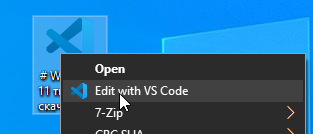 |
Сделать VScode Portable редактором по умолчанию Важно: смените путь к редактору на свой! (по умолчанию E:\VScode> |
❓ FAQ
# Как закрепить UWP на рабочий стол?
shell:AppsFolder
# Посмотреть все приложения UWP
Get-AppxPackage –AllUsers | Select Name, PackageFullName
# Полная команда, для подробного анализа
Get-AppxPackage –AllUsers


Как исправить кракозябры?

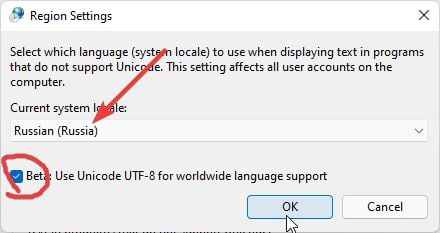
Включите русский язык по умолчанию в Параметры -> "Time&Language" -> "Language" -> "Administrative language settings" -> "Язык программ, не поддерживающих Юникод" -> "Изменить язык системы..." -> "Russia"


Как посмотреть последние файлы открытые на ПК?
%UserProfile%\AppData\Roaming\Microsoft\Windows\Recent
Как включить режим бога панель управления (GodMode?)
Создайте папку с именем:
Settings.{ED7BA470-8E54-465E-825C-99712043E01C}
Как сменить диск MBR в GPT (или наоборот) без потери данных?
Используйте инструмент pwfree9.iso
- Запишите ISO образ на флешку
- Загрузитесь с неё и выберите нужные диски
Инструкция: https://youtu.be/CQ0DUd1kyDs?t=133
🔗 Links
Реестр проводника:
- http://www.rusdoc.ru/material/os/win/reestr.shtml
- https://ss64.com/nt/syntax-reghacks.html
- http://centaz.narod.ru/winwork2.html
Памятка по командной строке (cmd.exe):
🖼 Wallpaper
Стандартно обои хранятся по пути:
C:\Windows\Web

🎨 Icons
Пак всех иконок из Windows 11
shell32.dll - оригинальный файл из папки System32 в Windows 11

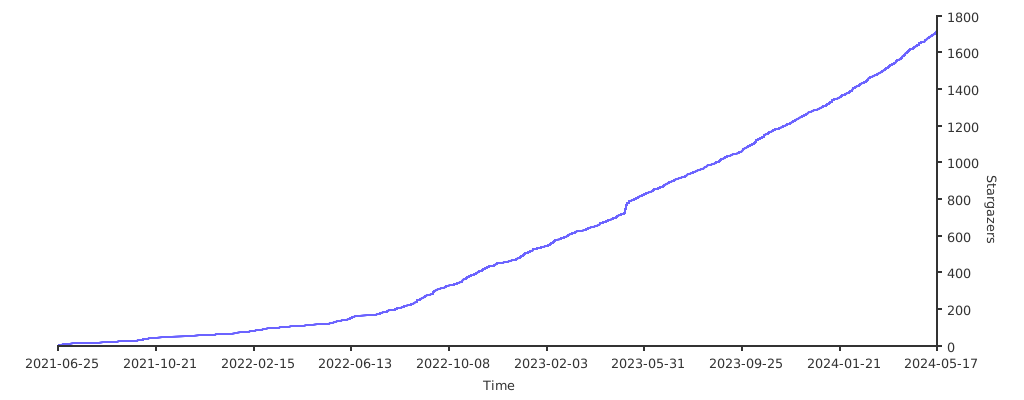
Stats