 Kyle FarnungandNiels van Velzen
b4d4837fda
Kyle FarnungandNiels van Velzen
b4d4837fda
**Changes**
When Exoplayer is used on the Android app it lets the server decide
which mode to use (direct play, direct stream, or transcode) based on
the device and content. If the content contains formats incompatible
with ExoPlayer (like compressed PGS subtitles), it will fail to load the
source. On the Android TV app it shows a similar source error in this
case, but still plays successfully. Checking the server shows that the
content is being remuxed without the subtitles, resolving the issue.
Similarly, enabling subtitles in the player forces a transcode that
allows the content to play.

This change adds similar fallback behavior, but it attempts to play the
highest quality stream on transient errors (like network flakiness).
This approach is based on
https://github.com/jellyfin/jellyfin-androidtv/pull/3916 and the
follow-up fix https://github.com/jellyfin/jellyfin-androidtv/pull/4999.

The retry workflow:
1. Try again without restrictions: it might have been a transient error
2. Try disabling direct play: maybe the container was an issue
3. Finally try transcoding when nothing else worked

The last error time is captured to reset the retry count after 30
seconds have elapsed. This should hopefully be enough time to avoid
falling back unnecessarily for transient issues. Retries will always
start with unrestricted again to maximize the quality and minimize the
stress on the server. Intentional track changes (audio or subtitle) also
reset the retry budget, since those are user-initiated reloads rather
than errors.

There's a race condition between retries in which the queue could try to
change the source. This is handled via coroutine cancellation. There's
still a small race which could cause the media from the current retry to
load briefly before the source change starts. This should be
self-correcting in practice.

**Issues**
Fixes #1931
Jellyfin for Android
Part of the Jellyfin Project









Jellyfin Mobile is an Android app that connects to Jellyfin instances and integrates with the official web client. We welcome all contributions and pull requests! If you have a larger feature in mind please open an issue so we can discuss the implementation before you start. Even though the client is only a web wrapper there are still lots of improvements and bug fixes that can be accomplished with Android and Kotlin knowledge.
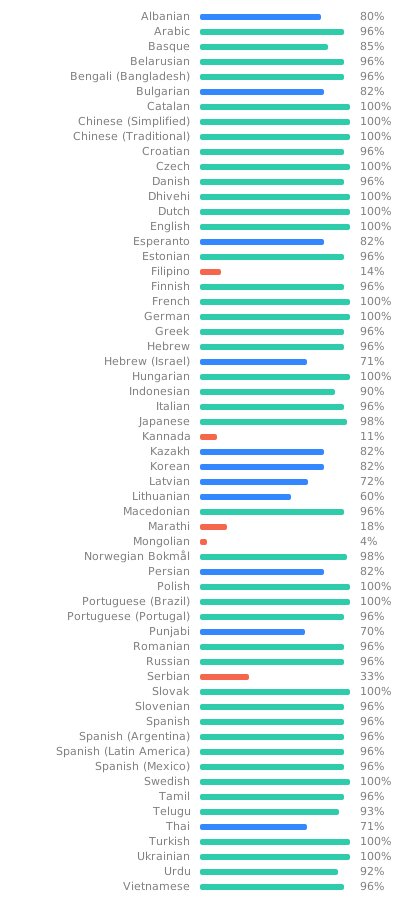
Most of the translations can be found in the web client since it's the base for the Android client as well. Translations for the app can also be improved very easily from our Weblate instance. Look through the following graphic to see if your native language could use some work!
This client was rewritten from scratch with a fresh git history in July to August 2020, and replaces the old Cordova-based client, which can still be found in the archives.
Build Process
Dependencies
- Android SDK
Build
-
Clone or download this repository
git clone https://github.com/jellyfin/jellyfin-android.git cd jellyfin-android -
Open the project in Android Studio and run it from there or build an APK directly through Gradle:
./gradlew assembleDebug
Deploy to device/emulator
./gradlew installDebug
You can also replace the "Debug" with "Release" to get an optimized release binary.
Release Flavors
There are two flavors (variants) of the Jellyfin for Android app:
- The proprietary version comes with Google Chromecast support
- The libre version comes without Google Chromecast support
The proprietary version is available on Google Play and the Amazon Appstore, while the libre version is available on F-Droid.
Additionally, beta releases exist for both flavors, but only the proprietary version is published to a beta track on Google Play.
If you'd like to test the beta outside of Google Play, you can simply download it from the GitHub releases.