mirror of
https://github.com/jellyfin/jellyfin-androidtv.git
synced 2026-10-27 17:21:54 +01:00
 dependabot[bot]andNiels van Velzen
a5d72c24bd
dependabot[bot]andNiels van Velzen
a5d72c24bd
Bumps [burnett01/rsync-deployments](https://github.com/burnett01/rsync-deployments) from 5.1 to 5.2.
- [Release notes](https://github.com/burnett01/rsync-deployments/releases)
- [Commits](https://github.com/burnett01/rsync-deployments/compare/5.1...5.2)

---
updated-dependencies:
- dependency-name: burnett01/rsync-deployments
  dependency-type: direct:production
  update-type: version-update:semver-minor
...

Signed-off-by: dependabot[bot] <support@github.com>
Jellyfin Android TV
Part of the Jellyfin Project









Jellyfin Android TV is a Jellyfin client for Android TV, Nvidia Shield, and Amazon Fire TV devices. We welcome all contributions and pull requests! If you have a larger feature in mind please open an issue so we can discuss the implementation before you start.
Translating
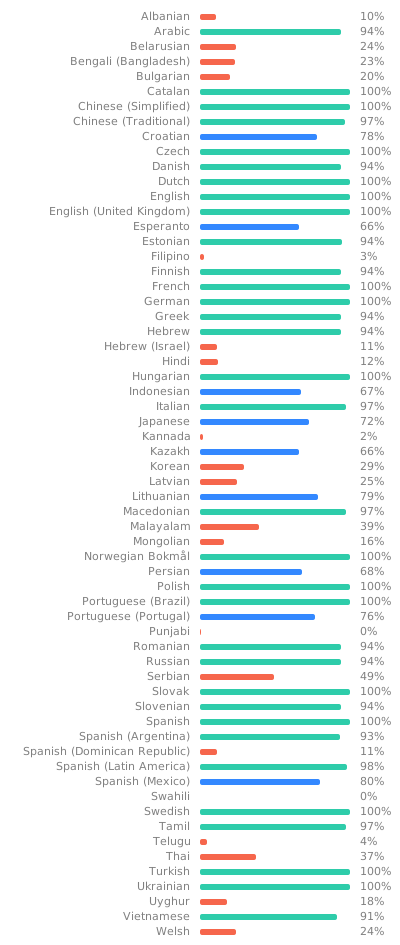
Translations can be improved very easily from our Weblate instance. Look through the following graphic to see if your native language could use some work!
Build Process
Dependencies
- Android Studio
Build
-
Clone or download this repository
git clone https://github.com/jellyfin/jellyfin-androidtv.git cd jellyfin-androidtv -
Open the project in Android Studio and run it from there or build an APK directly through Gradle:
./gradlew assembleDebugAdd the Android SDK to you PATH environment variable or create the ANDROID_SDK_ROOT variable for this to work.
Deploy to device/emulator
./gradlew installDebug
You can also replace the "Debug" with "Release" to get an optimized release binary.